





Without an Applicant Tracking System (ATS), recruiters spend hours toggling between spreadsheets, email, and disconnected job board dashboards just to keep track of who applied and where each candidate stands. It slows down hiring, introduces inconsistencies, and makes it harder to stay compliant with regulations such as EEO and GDPR. This guide covers what ATS screening is, how it works, what ATS scoring means from the recruiter's side, which features actually matter, and how to evaluate ATS recruiting software for your specific needs.
What Is an Applicant Tracking System (ATS)?
An ATS is recruitment software that centralizes key steps of the hiring process into one platform. In 2026, one industry roundup reported that 93% of recruitment professionals use an ATS [2], and the global ATS market is projected to grow from $18.57 billion in 2026 to $34.83 billion by 2034 [13]. Here is what an ATS does at a high level:
- Collects applications from job boards, career pages, and social channels into a single database
- Organizes candidate data into searchable, structured profiles using automated resume parsing
- Automates screening and communication through configurable filters, templates, and workflow triggers
- Tracks each applicant's progress through your pipeline, from first contact to signed offer
ATS for Corporate HR Teams vs. Recruitment Agencies
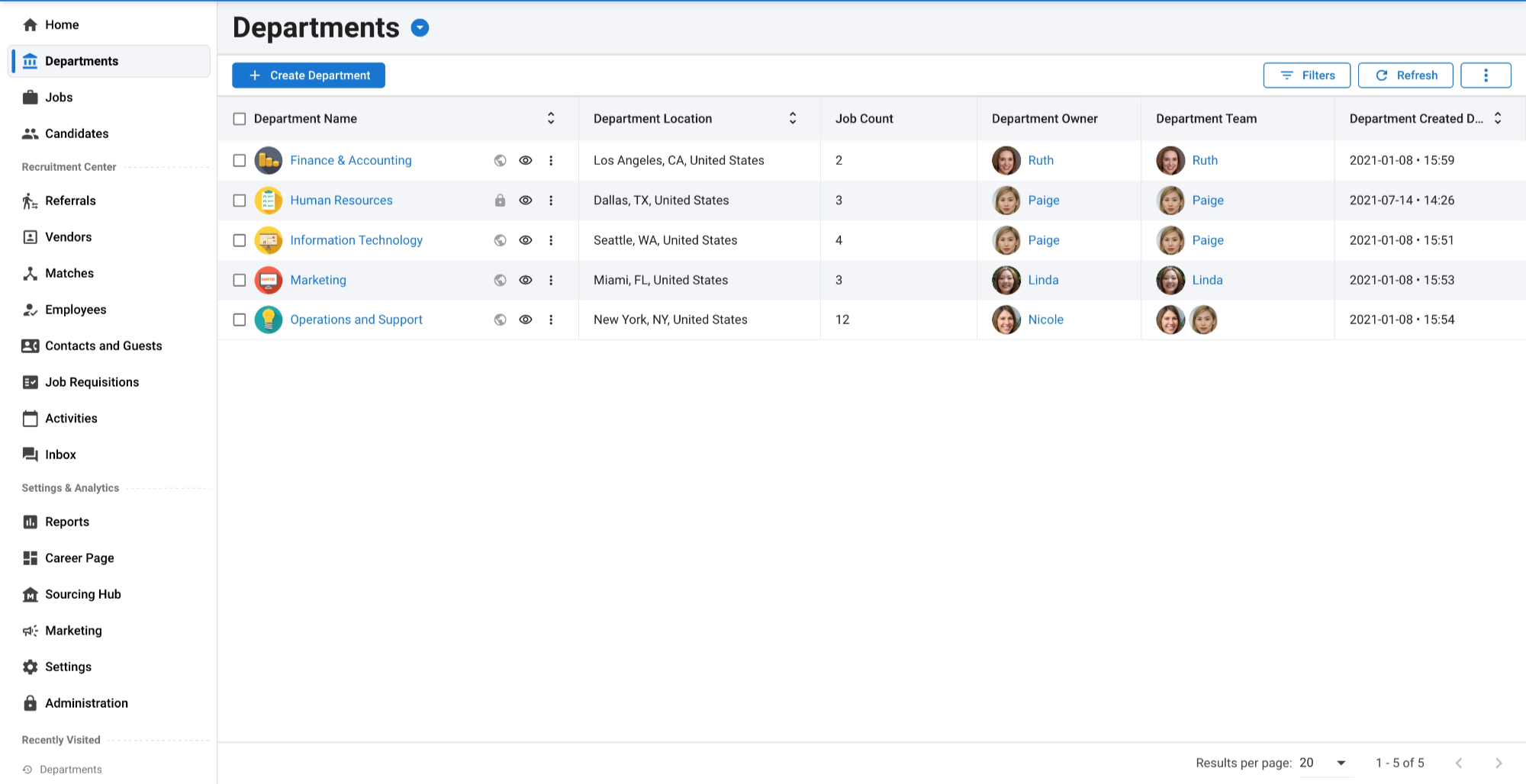
Corporate HR teams use an ATS primarily for internal hiring. Their priorities include:
- HRIS and onboarding integration: Candidate records need to flow into payroll, benefits, and employee management systems without manual re-entry.
- Compliance tracking: EEO, OFCCP, and GDPR documentation may need to be captured and tracked at each stage of the hiring process, depending on your jurisdiction and workflows.
- Hiring manager collaboration: Scorecards, interview feedback, and approval workflows keep hiring committees aligned without endless email threads.
- Standardized evaluation: Consistent screening criteria and structured interviews reduce bias and protect against audit risk.
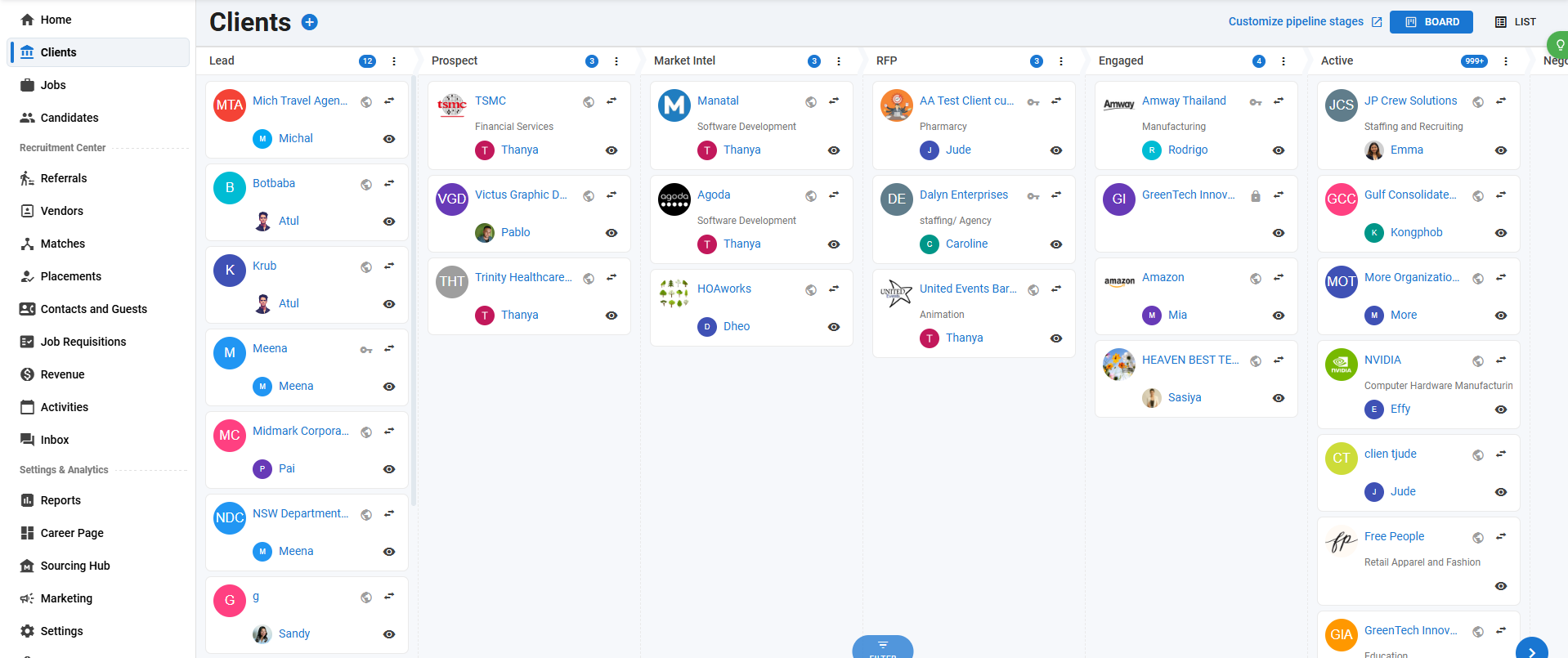
Recruitment agencies manage multiple clients, each with unique requisitions, fee structures, and submission requirements. Agency-specific ATS needs include:
- Multi-client pipeline management: Separate pipelines per client with distinct stages, branding, and candidate pools.
- Candidate ownership tracking: Clear records of which recruiter sourced which candidate, critical for commission allocation and client billing.
- Custom permission management: Manatal’s custom permissions enable administrators to tailor exactly what actions each user role can perform on specific jobs and organizations, ensuring data governance without hindering daily operations.
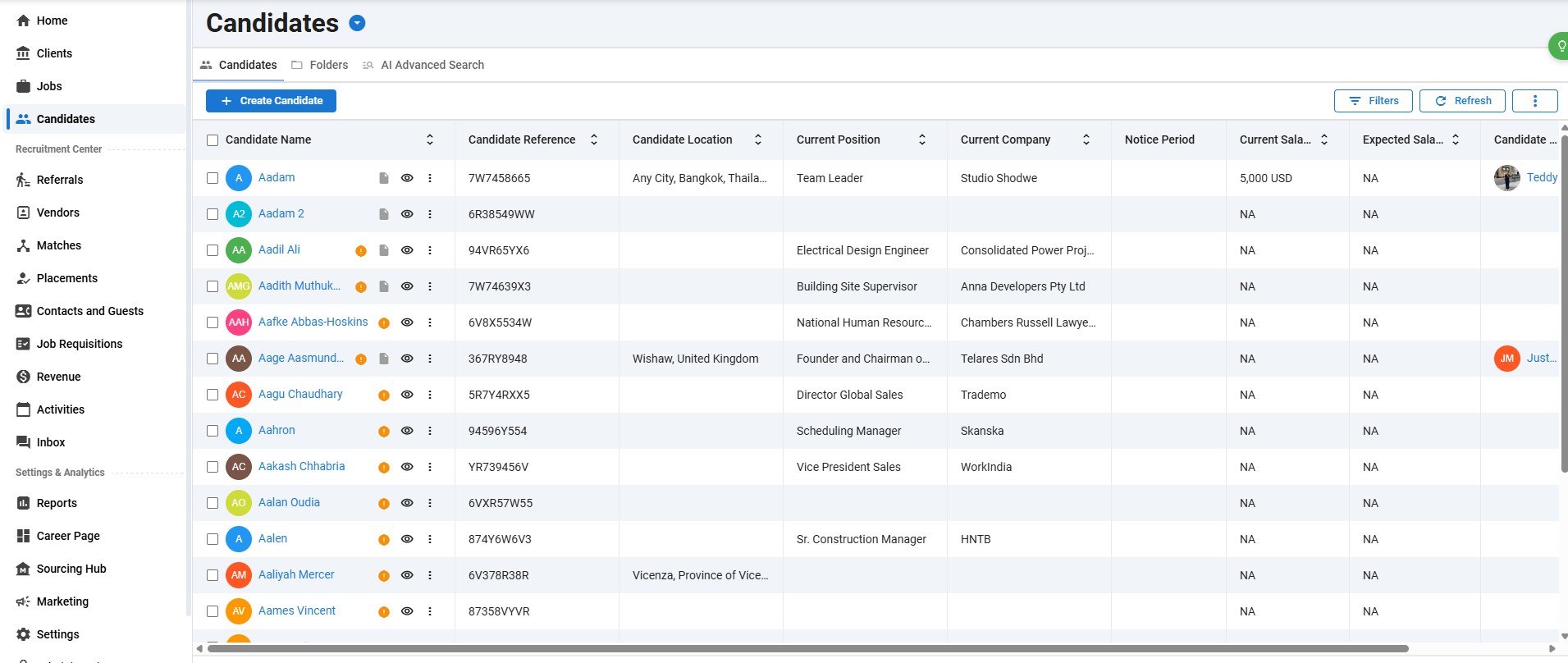
- Combined ATS and CRM functionality: Agencies need to manage active applicants and nurture passive candidates for future placements simultaneously. Platforms like Manatal combine both an Applicant Tracking System and a Recruitment CRM in a single system, which can reduce the need for separate tools.
- Client collaboration portals: Direct involvement accelerates the submission-to-hire cycle. Manatal’s guest portal allows agencies to securely invite clients to track recruitment progress, review candidate profiles, and provide feedback directly within the platform. This experience can be further white-labeled with the agency's logo, colors, and custom domain through the Premium Guest Portal.
- Client reporting: Submission summaries, time-to-fill metrics, and placement analytics delivered directly to clients.
{{cta}}
How Does ATS Recruiting Software Work?
An ATS follows the same hiring workflow you already use. The difference is that every step happens inside one system instead of across five disconnected tools.
Here is the typical ATS workflow from the recruiter's perspective:
- Create a job requisition: Define the role, requirements, compensation range, and approval chain. The ATS stores this as a structured record tied to your hiring pipeline.
- Post to job boards: Distribute the listing to multiple job boards, your branded career page, and social channels with a single click instead of logging into each platform separately.
- Collect applications: Resumes and application forms flow into the ATS automatically from every source. Each candidate gets a unified profile.
- Parse resumes: The ATS extracts contact information, work history, skills, education, and certifications from unstructured documents and converts them into searchable, structured data fields.
- Screen and filter: Automated screening rules evaluate each application against your predefined criteria. Candidates who meet minimum qualifications advance. Those who do not are flagged or filtered.
- Rank candidates: The system assigns relevance scores based on how closely each candidate matches job requirements, surfacing your strongest applicants first.
- Schedule interviews: Calendar integrations let you coordinate availability across interviewers, send confirmation emails, and track interview completion without the back-and-forth.
- Extend offers: Generate offer letters, route them for approval, and track acceptance within the same system where the candidate's entire history is documented.
Many ATS platforms centralize candidate communication, logging emails, interview notes, scorecards, and status changes. LinkedIn’s 2025 report says recruiters experimenting with or integrating generative AI save about 20% of their work week, roughly one day [10], and ATS automation can compound those savings by reducing manual data entry, status updates, and follow-up reminders.
How Resume Parsing and Data Extraction Work
Resume parsing is the engine behind ATS data organization. When a candidate submits a resume as a PDF, Word document, or plain text file, the ATS parser breaks the document into discrete fields.
The parser identifies and extracts:
- Contact information (name, email, phone, location)
- Work experience (job titles, employers, dates, responsibilities)
- Skills (technical skills, soft skills, certifications)
- Education (degrees, institutions, graduation dates)
Modern parsers use natural language processing to handle formatting variations, non-standard layouts, and multilingual documents. The quality of parsing directly affects your search results, so this is a feature worth testing during any ATS evaluation.
What Is ATS Screening?
ATS screening is the automated filtering process where the system evaluates incoming applications against criteria you define. Instead of manually reviewing every resume to determine baseline qualification, the ATS applies your rules at scale and surfaces only the candidates who meet your requirements.
Common screening mechanisms include:
- Keyword matching. The ATS compares resume content against the skills, tools, and qualifications listed in your job description. Candidates with strong keyword alignment score higher.
- Qualification gates. Hard filters based on non-negotiable requirements: minimum education level, required certifications, years of experience. Candidates who do not meet these gates are automatically flagged.
- Knockout questions. Custom application questions that disqualify candidates based on specific responses. Examples: "Are you authorized to work in the United States?" or "Do you have an active PMP certification?"
- Custom criteria. Role-specific filters you configure per requisition, such as industry experience, language proficiency, willingness to relocate, and salary expectations.
The screening step is often where an ATS delivers the most value. Without it, a recruiter reviewing 250 applications manually spends an average of 30 seconds per resume. That is over two hours on initial screening alone, for a single role. Automated screening reduces that to minutes.
Setting Up Effective Screening Criteria
The most common screening mistake is setting filters too aggressively. Overly strict criteria disqualify qualified candidates who use different terminology or format their experience differently than your job description expects.
Balance strictness with reach:
- Use required criteria sparingly. Reserve hard knockout filters for genuine non-negotiables: licensure, security clearance, legal work authorization. Everything else should influence ranking, not elimination.
- Test your filters. After configuring screening rules, run a test batch to see how many candidates pass. If very few candidates pass, your criteria are likely too narrow.
- Update criteria per role. Copy-pasting screening rules from one requisition to another leads to mismatched filters. Adjust keywords, experience levels, and qualification gates to reflect each specific role.
- Review filtered-out candidates periodically. Check a sample of screened-out applications to confirm your filters are working as intended. Good candidates slipping through the cracks is a fixable problem, but only if you catch it.
Platforms like Manatal pair automated screening with AI-powered candidate matching, so you get both rules-based filtering and intelligent relevance scoring that accounts for context beyond exact keyword matches.
What Is an ATS Score and How Does Candidate Ranking Work?
An ATS score is a relevance ranking that indicates how closely a candidate's profile matches your job requirements. There is no universal ATS score standard; each platform uses its own scoring algorithm, weighting factors, and scale (percentage match, tiered categories, or custom rankings). The purpose is the same: prioritize candidates so you spend your time reviewing the most promising applicants first.
As a recruiter, you typically control the scoring inputs:
- Skills weighting: Assign higher importance to critical technical skills or certifications.
- Experience level: Configure how heavily years of experience influence the score.
- Education: Decide whether degree requirements boost or gate candidate rankings.
- Custom factors: Add role-specific criteria like industry background, language skills, and location proximity that adjust how candidates are ranked.
The business impact is direct: 86% of recruiters say their ATS reduced overall time-to-hire [4]. Scoring accelerates this by eliminating the need to manually compare every applicant against job requirements. You focus on your top-ranked candidates first and work down the list only if needed.
Key Features to Look for in an ATS
Not every ATS is built the same. When evaluating ATS recruiting software, focus on the capabilities that directly affect your hiring speed, candidate quality, and team efficiency. Here are the features that matter most:
- Job posting and distribution: Single-click posting to multiple job boards, social channels, and your branded career page. Manual posting to each platform is time you cannot get back.
- Resume parsing and candidate profiles: Automated extraction of resume data into structured, searchable profiles. Look for parsers that handle multiple file formats, languages, and non-standard layouts.
- Screening and filtering automation: Configurable rules that filter applications by keywords, qualifications, knockout questions, and custom criteria, reducing manual resume review to minutes.
- Interview scheduling and calendar integration: Syncing with Gmail, Outlook, or Office 365 to coordinate interviewer availability, send confirmations, and log completed interviews automatically.
- Reporting and analytics: Dashboards tracking time-to-fill, cost-per-hire, source effectiveness, pipeline velocity, and other metrics your leadership team needs to evaluate recruitment performance.
- Collaboration tools: Scorecards, structured feedback forms, and approval workflows that keep hiring managers and interviewers aligned without lengthy email chains.
- Compliance management: Built-in EEO/OFCCP reporting, GDPR data handling, and audit trails that protect you during regulatory reviews.
- Integrations: Connections to your HRIS, payroll, email, calendar, assessment tools, and background check providers. An ATS that operates in isolation creates more data silos than it solves. Manatal, for example, offers integrations via Zapier and an API for custom HRIS and payroll connections
The adoption trend is clear: 79% of organizations have already integrated AI or automation into their ATS [8]. If your current system lacks these capabilities, you are operating at a disadvantage relative to competitors hiring from the same talent pool.
AI-Powered Features That Actually Matter
AI in recruiting is increasingly producing measurable results. The features that deliver measurable results include:
- Intelligent candidate matching: AI analyzes candidate profiles against job requirements using semantic understanding, not just keyword matching. This means a candidate listing "financial modeling" still matches a job requiring "financial analysis," even without an exact keyword overlap.
- Resume enrichment: AI pulls publicly available information from social profiles and professional networks to fill gaps in candidate records, giving you a fuller picture before the first conversation.
- Automated interview scheduling: AI-assisted scheduling tools find optimal times across multiple calendars, reducing the coordination overhead that bogs down hiring timelines.
- Predictive analytics: Data-driven forecasting of pipeline health, time-to-fill projections, and candidate drop-off risk so you can address bottlenecks before they stall your pipeline.
Manatal's AI Advanced Search uses semantic and Boolean filters with relevance scoring to surface best-fit candidates from your database. Combined with Candidate Enrichment, AI Recommendations, and the AI Interviewer, you get an integrated AI layer across the entire hiring workflow, not isolated point features bolted onto a legacy system. You can explore the full benefits of an AI-powered ATS in detail.
How to Evaluate an ATS for Your Hiring Needs
Choosing the right ATS starts with understanding your own requirements, not a vendor's feature list. Use this framework to evaluate ATS recruiting software systematically.
Start with your hiring reality:
- Volume: How many roles do you fill per month? A team hiring five people quarterly has different needs than an agency placing 50 candidates monthly.
- Complexity: Do you hire for one location or globally? One department or 20? Single-client or multi-client? Complexity determines how much pipeline customization and permission management you need.
- Team size: How many recruiters, sourcers, and hiring managers will use the system? Collaboration features matter more as team size increases.
- Integration requirements: Which systems must your ATS connect to: HRIS, payroll, assessment tools, background checks, email? List your non-negotiable integrations before the first demo.
Watch for red flags:
- No free trial: If a vendor will not let you test the product with real data before committing, that is a signal. Manatal offers a 14-day free trial with full feature access, no credit card required.
- Limited reporting: If the ATS cannot generate the metrics your leadership needs (time-to-fill, source effectiveness, pipeline conversion rates), you will be building reports manually.
- Poor mobile experience: Recruiters work from their phones. If the mobile interface is an afterthought, adoption will suffer.
- Vendor lock-in: Ask about data export. If you cannot take your candidate data with you when you leave, you are renting access to your own records.
According to Select Software Review, 79% report improved hire quality after implementing an ATS [5]. This means that the right system pays for itself in time saved, and hires improved.
Questions to Ask During an ATS Demo
Go beyond the standard walkthrough. These questions reveal what marketing materials do not:
- How does your system handle resume parsing for non-standard formats? Ask them to parse a real resume with unusual formatting during the demo. Watch how accurately it extracts data.
- What happens to my data if I cancel? Understand the export format, timeline, and any fees for data migration out.
- How long does implementation take for a team of my size? Get a specific timeline with milestones, not a range.
- What does your AI actually do vs. what requires manual configuration? Separate genuine automation from features that still require heavy recruiter input to function.
- Can I see your uptime and incident history? Reliability matters. Ask for SLA terms and historical performance data.
- How do you handle GDPR and data retention compliance? Especially critical if you hire internationally. Ask to see the compliance workflow, not just a checkbox on a feature list.
- What does your pricing look like at 2x and 5x my current hiring volume? Scalability pricing surprises are common. Understand the cost trajectory before you commit.
Conclusion
An ATS is the operational backbone of modern hiring, with 93% of recruitment professionals using one [2]. The right system surfaces your strongest candidates automatically, so you spend less time on manual review and more time making hiring decisions. Evaluate based on your specific reality (agency vs. corporate, hiring volume, integration requirements, AI capabilities) rather than feature comparison charts.
Frequently Asked Questions
Q: Is an ATS suitable for small businesses?
A: Yes. An ATS is not just for large enterprises. Small businesses that hire even a handful of people per year benefit from centralized candidate tracking, automated job posting, and structured screening. Cloud-based platforms make setup fast and affordable. Manatal's ATS combines applicant tracking with a Recruitment CRM in one platform, and teams can get started with a 14-day free trial to test fit before committing.
Q: What happens after a candidate applies through an ATS?
A: Once a candidate submits an application, the ATS parses the resume into structured data, checks it against your screening criteria, and assigns a relevance ranking. Qualified candidates appear in your review queue with their profile, parsed skills, and match indicators ready for evaluation. Manatal automates this entire intake process, so candidates move from application to your shortlist without manual data entry.
Q: Do I need an ATS for my company?
A: If you hire more than a few people per year, an ATS saves time and improves consistency. It eliminates spreadsheet tracking, reduces manual resume review, and helps you stay compliant with hiring regulations. Even small teams benefit from centralized candidate management and automated job posting. Manatal offers a 14-day free trial so you can test the platform with your actual hiring workflow before committing.
Q: Can multiple team members collaborate inside an ATS?
A: Yes. Most ATS platforms support multi-user collaboration with role-based permissions, shared scorecards, and structured interview feedback. Hiring managers can review candidates and leave evaluations without needing a separate tool. Manatal includes built-in collaboration features like shared pipelines, team activity feeds, and configurable approval workflows so your entire hiring committee stays aligned.
Q: How long does it take to implement an ATS?
A: Implementation timelines vary by team size and complexity. Small teams can be up and running within a few days. Larger organizations with custom integrations and compliance requirements may need two to four weeks.
Q: What is the difference between an ATS and a CRM?
A: An ATS manages active job applicants through the hiring pipeline. A recruitment CRM (candidate relationship management) builds and nurtures relationships with passive candidates before they apply. Many modern platforms combine both. Manatal integrates its Applicant Tracking System and Recruitment CRM into one platform, giving you a single system that covers both active hiring and long-term pipeline management.
Q: What is the best ATS software?
A: The best ATS depends on your hiring needs. Corporate HR teams prioritize compliance and HRIS integration. Recruitment agencies need multi-client management and candidate tracking. Evaluate based on your hiring volume, required integrations, AI capabilities, and budget. Manatal offers AI-powered applicant tracking, a built-in Recruitment CRM, 3,000+ integrations, and a 14-day free trial, making it easy to test whether the platform fits your workflow.
Citations
[1] Jobscan
[7] SHRM
[9] SHRM
[10] LinkedIn
[13] Fortune Business Insights
[14] LinkedIn
.webp)







.webp)

.webp)


.webp)


