





Most HR teams are limited by execution bottlenecks across hiring, onboarding, and workforce management. HR automation addresses this by turning fragmented tasks into connected, rule-based workflows that run consistently without manual intervention. In this guide, we break down what HR automation is, highlight tools that handle core HR processes, and explain how to implement automation step by step so it improves speed, data quality, and operational control from day one.
What Are HR Automation Software Tools?
HR automation software is a platform that streamlines and automates HR processes using predefined rules, triggers, and workflows. They reduce manual coordination across the employee lifecycle, from onboarding through offboarding.
Common HR automation tools are used to:
- Trigger onboarding workflows, including document collection and policy acknowledgments
- Sync employee data across HRIS, payroll, benefits, and time-off systems
- Route approvals for leave requests, expenses, and internal HR actions
- Automate compliance tracking, reminders, and audit logs
- Schedule performance reviews, feedback cycles, and training assignments
In short, HR process automation sits at the operational core of HR, connecting systems and reducing admin overhead after a candidate is hired.
HR Automation Tools and Pricing
You can utilize specialized platforms to automate administrative HR tasks such as payroll, compliance, and employee lifecycle management. Below are some of the tools focused on post-hire operations and their associated costs.
Connecting Recruitment to HR Management

HR automation isn’t just about speeding up hiring workflows. It’s about what happens right after you decide to hire someone. That’s where most teams still lose time.
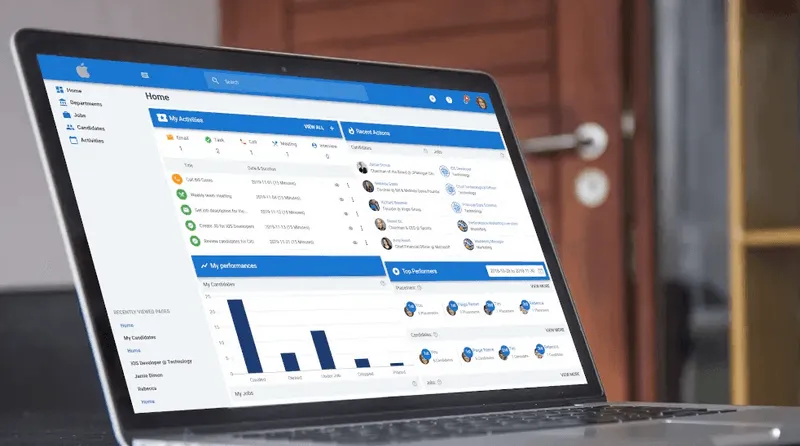
Manatal’s HRMS integrations close that gap by automating the transition from candidate to employee. Instead of treating recruitment and HR as separate systems, Manatal connects them so approved candidates can move directly into your HR platform with minimal friction.
When a candidate is ready to be hired, recruiters can send their profile from Manatal into systems like BambooHR in just a few clicks. Key information such as personal details and employment data is carried over automatically, eliminating the need for duplicate data entry and reducing the risk of errors.
What this really means is:
- Faster handoff to HR: Candidate data moves instantly from the ATS to your HR system once a hiring decision is made
- Less manual admin: No more copying and pasting candidate details across platforms
- Cleaner data consistency: Information stays aligned between recruitment and HR records
- Stronger end-to-end automation: Recruitment doesn’t stop at “offer accepted” — it flows directly into onboarding and employee management
Connecting Manatal with your HRMS extends automation across the entire talent lifecycle, carrying candidate data from the first touchpoint through to a fully onboarded employee.
{{cta}}
HR Automation Across the Full Employee Journey
HR automation only delivers real leverage when it extends beyond hiring. The objective is simple: once a candidate is hired, their data should move across onboarding, access provisioning, learning, compliance, and offboarding without duplication or manual intervention. Manatal’s HRMS integrations act as the handoff point from recruitment into HR operations, while tools like Microsoft Entra, Docusign, and Docebo handle downstream workflows.
1) Onboarding: trigger once, automate everything downstream
Start with a single event: offer accepted. That event should trigger every onboarding action across HR, IT, and the hiring manager. Instead of assigning tasks manually, define a workflow that generates documents, provisions access, and assigns onboarding steps automatically.
Use this HR automation setup:
- Generate contracts and onboarding documents using Docusign templates.
- Assign a structured onboarding checklist (HR, IT, manager) using Asana templates.
- Provision accounts automatically through tools such as Microsoft Entra using HR-driven provisioning.[1]
You eliminate back-and-forth between HR and IT. The system creates the employee record, assigns tools, and ensures the new hire is productive on day one.
2) Employee engagement and development: automate recurring signals
Engagement fails when it depends on memory. You need recurring, system-driven touchpoints that collect feedback, trigger reviews, and assign development paths automatically.
Set up your HR automation workflow like this:
- Schedule pulse surveys by team or tenure using Culture Amp or Microsoft Forms
- Trigger performance review cycles using task management systems like Microsoft Planner or Teams
- Assign learning paths automatically based on role changes via LMS tools like Docebo
- Automate milestone recognition (anniversaries, promotions) tied to HR data events
Engagement becomes measurable and continuous, not anecdotal or reactive.
3) Compliance and administration: replace manual tracking with rule-based workflows
Compliance breaks when it lives in spreadsheets. Instead, treat every requirement as structured data with deadlines, ownership, and automated follow-ups.
Here’s how to do it:
- Standardize policy acknowledgment using SHRM templates and Docusign workflows
- Track certifications and training with expiry dates and automated reminders
- Use Microsoft Forms for structured data collection, not storage
- Automate access changes through Microsoft Entra when roles change
This removes the need for HR to chase employees manually and reduces compliance risk tied to missed deadlines.
- Offboarding: automate before the last day, not after
Offboarding is where most organizations lose control. Access remains active, assets are not tracked, and exit data is inconsistent. Fix this by triggering offboarding workflows as soon as a departure is confirmed.
Execute it like this:
- Trigger pre-offboarding workflows using Microsoft Entra lifecycle templates
- Assign exit interviews using structured templates
- Revoke access and remove licenses automatically on the final day
- Track asset recovery, payroll closure, and documentation via a checklist workflow
This ensures security, compliance, and clean data without relying on last-minute coordination.
- Where to start: prioritize high-friction handoffs
Do not try to automate everything at once. Focus on the transitions where work breaks down or gets delayed.
Start here:
- Offer accepted → onboarding workflow triggered
- Employee created → access provisioning automated
- Role change → learning and permissions updated
- Exit confirmed → offboarding workflow triggered
Manatal handles the recruitment side and feeds structured data into HR systems. From there, tools like Microsoft Entra, Docusign, Docebo, and Asana execute the rest of the lifecycle.
What this really means is HR stops acting as a task manager and starts operating as a system designer.
HR Automation Readiness Checklist
Before turning on any HR automation, run your workflow through this checklist. Automation acts as an accelerant: it makes a good process faster, but it makes a broken process fail at scale.
Decision Rule:
- 5/5 = Go → Safe to automate
- 3–4/5 = Fix first → Clean up gaps before automating
- ≤2/5 = No-Go → You’ll scale problems, not efficiency
Measuring ROI of HR Automation and Tracking Success Metrics
A practical benchmark many HR automation teams use is 200% to 400% ROI in year one for high-volume workflow automation. This makes HR automation ROI measurable against real operational baselines. Everest Group’s intelligent automation research reports that top enterprises can reach 200% ROI or more, which is a useful reality check when you build your own model.[2]
1) Capture your baseline before you automate
Start with a 2 to 4 week baseline window. Pull the numbers from your current ATS, calendar, email, and spreadsheets before you change anything so you are comparing against real performance, not memory.
Track these baseline inputs:
- Time-to-first-contact
- Cost-per-hire
- Stage conversion rate at each funnel step
- Recruiter capacity measured as active reqs or candidates handled per recruiter
- Error rate such as duplicate records, missed follow-ups, or manual corrections
- Employee satisfaction using eNPS or a short pulse survey after onboarding
Use Manatal’s advanced reports to capture recruiter activity, workflow progress, and pipeline movement. For team-wide tracking outside the ATS, use Google Sheets or Excel as the source-of-truth calculator and keep the raw exports attached for auditability.
2) Build the ROI formula in one sheet
Set up a simple worksheet with one row per automation use case. For each row, calculate the monthly value created by time savings and error reduction, then subtract software and implementation cost.
Use this formula:
ROI (%) = [(Hours saved × fully loaded hourly rate) + error-reduction savings − (tool cost + implementation cost)] / (tool cost + implementation cost) × 100
Use this structure in your tracker:
If you need a working template, build it in Google Sheets first, then publish it as an internal ROI tracker. Add formulas for monthly savings, annualized savings, and payback period so the spreadsheet updates automatically.
3) Measure the metrics that automation should move
Do not track vanity metrics when evaluating HR automation. Track only the metrics that change when workflows become more structured.
Use this metric set:
- Time-to-first-contact: Measure hours from application received to first reply. This should fall immediately when acknowledgements and routing are automated.
- Cost-per-hire: Divide total recruiting spend by hires made. Automation should lower admin cost and reduce wasted recruiter time.
- Stage conversion rates: Track conversion from application to screen, screen to interview, interview to offer, and offer to hire. Automation should reduce drop-off caused by slow follow-up.
- Recruiter capacity: Measure the number of active reqs, qualified candidates, or hires each recruiter can support without increasing overtime.
- Error rate: Count duplicate records, missed follow-ups, incorrect status updates, and incomplete onboarding tasks. This is where HR automation often pays back fastest.
- Employee satisfaction: Use a simple eNPS or pulse survey after onboarding, role changes, or offboarding. A broken automation flow usually shows up here before it shows up in leadership reports.
4) Instrument the data flow so you are not cleaning spreadsheets by hand
Put the reporting logic where the data is already created. In Manatal, use its hiring performance reports to reduce manual reporting. Then connect anything missing with Zapier, Google Forms, or Microsoft Forms so the data lands in one place automatically.
A clean setup looks like this:
- Manatal for recruiting pipeline data and recruiter activity.
- Google Sheets for ROI calculations and month-over-month comparisons.
- Looker Studio or Power BI for dashboard visualization.
- Clockify or a similar time tracker for measuring admin time before and after automation.
- Google Forms or Microsoft Forms for quick employee pulse checks.
Keep the schema tight. Every record should include the same fields every time:
- Workflow name
- Owner
- Trigger date
- Completion date
- Exception flag
- Time saved
- Error count
- Cost impact
5) Review the numbers on a fixed cadence and kill weak automations fast
Review performance weekly for the first month, then monthly after that. A workflow that saves time but creates exceptions is not successful. It is just shifting work somewhere else.
Use a simple review rule:
- Green: time saved is up, error rate is down, and the team is using the workflow without manual intervention.
- Amber: the workflow works, but exceptions or delays are still common.
- Red: the process creates rework, slows response times, or requires too much manual oversight.
Tie each review back to a specific action:
- Tighten the trigger.
- Remove a manual approval.
- Fix a broken data field.
- Update the workflow owner.
- Retire your HR automation if it is not producing measurable value.
Real-World HR Automation Case Studies
1) Mid-market recruiting automation: JB Hired and Manatal
JB Hired, a recruitment agency serving digital and tech roles across Asia and MENA, reported a 50% reduction in time-to-hire after moving to Manatal. The implementation was practical, not theoretical: the team migrated candidate and client data through CSV, connected G Suite calendars and email, and embedded a career page to route applications into one system.[3]
What made this work was consolidation. Instead of juggling Excel, email threads, and a separate CRM, recruiters worked from one pipeline with AI Recommendations and centralized communication. The result was faster sourcing, cleaner collaboration, and less time spent on admin.[3]
2) Payroll and onboarding automation: Double Good and Rippling
Double Good reported that payroll and onboarding were bogged down by manual data entry, syncing problems, and clunky offboarding. After moving to Rippling, the company said it saved 30 admin hours per month, made onboarding 10x faster, and cut $50,000 a year in operating cost.[4]
The useful lesson is that the win came from connecting workflows, not just digitizing forms. Once worker data, payroll, and onboarding lived in the same system, the team stopped rekeying information and stopped chasing errors across tools. That is the kind of result to look for when you automate one high-volume handoff first.[4]
3) Payroll, compliance, and HRIS sync: Aptera and Rippling
Aptera reported $225,000 in annual savings after replacing a fragmented HR setup with Rippling, including savings from benefits, payroll, and outside legal support. The company also said payroll now takes one to five minutes per run, down from hours, and salary changes in the HRIS automatically update payroll data.[5]
This is the clearest proof that HR automation is not just about speed. It also reduces compliance risk by removing duplicate data entry and keeping employee records synchronized across systems. When the HRIS and payroll layer stay aligned, the audit trail gets cleaner and the team spends less time fixing preventable mistakes.[5]
Similar results are achievable with Manatal’s native workflows, reports and analytics, and Zapier integrations, which let you automate trigger-based recruiting steps and track activity without manual spreadsheet work.
Conclusion
HR automation replaces fragmented manual processes with structured, rule-based systems that improve consistency, auditability, and control across the employee lifecycle. As competition increases and data regulations tighten, relying on manual workflows leads to slower response times, inconsistent records, and higher compliance risk, while HR automation enforces standardized data, clear audit trails, and predictable execution. Teams that implement HR automation early reduce operational overhead, maintain cleaner data across systems, and scale hiring and workforce management without introducing errors or delays.
Frequently Asked Questions
Q: Does automating resume screening introduce bias?
A: HR automation can introduce bias if the scoring model is configured against criteria that correlate with protected characteristics. The risk is not unique to automation; manual screening introduces the same bias with less consistency. Mitigation starts with defining scoring criteria strictly around job-relevant qualifications, validating those criteria with HR or legal, and auditing score distributions across candidate groups over time. Within Manatal, AI scoring criteria can be configured and adjusted, and candidate profiles remain fully visible, allowing recruiters to review and override automated rankings when needed.
Q: What is the minimum viable automation setup for a team of two to five recruiters?
A: Start with three HR automation workflows: resume parsing and AI scoring on inbound applications, an automated acknowledgment email triggered on submission, and stage-based task assignments that notify the responsible recruiter when action is required. In Manatal, this can be implemented using resume parsing, AI candidate scoring, automated email workflows, and pipeline stage triggers. This setup removes the highest-volume manual tasks without requiring complex integrations.
Q: How do you measure whether automation is working?
A: To measure HR automation, track four metrics before and after implementation: time-to-first-contact, screening time per requisition, stage conversion rates, and recruiter capacity. Improvements in time-to-first-contact and screening time should appear within two to four weeks, while conversion rates and capacity improve as workflows stabilize. Manatal’s reporting and analytics dashboards allow you to monitor these metrics at the pipeline and recruiter level, with activity logs providing visibility into workflow execution.
Q: What processes should never be automated?
A: Any step that requires interpreting individual candidate context, negotiation or compensation discussions, delivering late-stage rejections, or assessing cultural fit. These require judgment and human context. Manatal’s workflow automation is designed to handle structured, repeatable steps, while keeping recruiters in control of decision points, communication, and candidate relationship management.
Citations
.webp)






.webp)

.webp)


.webp)


