





Indeed’s scale makes it one of the most effective sources of applicants, but that same scale means results depend heavily on how roles are structured and managed. If you treat Indeed like a bulletin board where you simply pin a PDF and walk away, you will likely struggle with low application quality. This guide isn't just about where to click. We will cover how to post a job on Indeed for maximum visibility, how to decide between Free vs. Sponsored budgets, and, importantly, how to handle the recruitment chaos that usually follows the "Publish" button.
Before You Log In to Post a Job on Indeed
If you start drafting your job description directly inside Indeed’s editor, you are already limiting your reach. Indeed’s matching and ranking systems rely heavily on structured inputs and clarity.
Use standardized job description templates to ensure consistency, improve search visibility, and reduce revision cycles when roles need to be reused or distributed across multiple platforms.
Before posting, prepare the following assets:
- Standardized Job Title: Avoid internal jargon. If you are hiring a "Sales Development Representative," do not post it as "Revenue Rockstar" or "Sales Ninja." Creative titles lower your SEO visibility.
- Salary Range: Certain states in the United States mandate disclosure of salary ranges in job postings.[1] Indeed concurs that job seekers prioritize listings with clear pay bands.[2]
- Pre-Screening Questions: Have 3-5 non-negotiable "knockout" questions ready (e.g., "Do you have a valid driver's license?"). This saves hours of manual resume screening later.
- Company Pitch: A short, two-sentence blurb about why a candidate should care. Keep it candidate-centric, not just a history of your founding year.
How to Post a Job on Indeed
Once preparation is complete, follow this workflow to publish your role.
1. Account Setup and Job Creation: Log in to the Employer Dashboard and click Post a Job. First-time employers will be prompted to verify company details to reduce fraudulent postings.
2. Structured Job Details: This section has a direct impact on who sees your job.
- Job Title: Enter the standardized title and select the closest suggested match. This connects your job to Indeed’s taxonomy and improves discoverability.
- Location: Use the platform’s location settings accurately. “Remote” should be configured as a work arrangement, not buried in the description.
- Job Type: Select all applicable options (full-time, contract, commission-based, etc.) to ensure correct filtering.
3. The Description and Formatting: Once you’ve prepared the job description, copy and paste it on Paste your prepared description.
- Break responsibilities and requirements into bullet points to improve scannability.
- Introduce role-specific keywords naturally in the opening paragraphs (for example, tools, skills, or industry terms candidates actively search for).
4. Application Method Selection: Indeed allows candidates to apply via "Indeed Apply" (easier for them, higher volume for you) or redirects them to your career site.
- If you do not use an ATS, Indeed Apply typically generates higher application volume.
- Enable candidate messaging to keep communication centralized within the platform.
5. Adding Screening Questions: If a candidate answers "No" to a mandatory requirement (like visa sponsorship or certification), Indeed can automatically move them to a "Rejected" status, so you never see them. This significantly reduces the time spent reviewing unsuitable applications and prevents administrative overload.
6. Preview and Confirm: Review the mobile preview before publishing. Most job seekers apply on mobile devices, and poor formatting or a hidden apply button can reduce conversion rates immediately.
Managing Recruitment After Posting a Job on Indeed
When you follow the steps above, your job will go live only on the platform. To maximize reach, you need to duplicate postings across other general and specialized boards.
This manual approach creates several inefficiencies that recruitment automation is designed to eliminate:
- Repetitive copy-paste workflows across platforms
- Multiple application inboxes to monitor daily
- Manual resume downloads and data re-entry
- Inconsistent candidate tracking and compliance risk
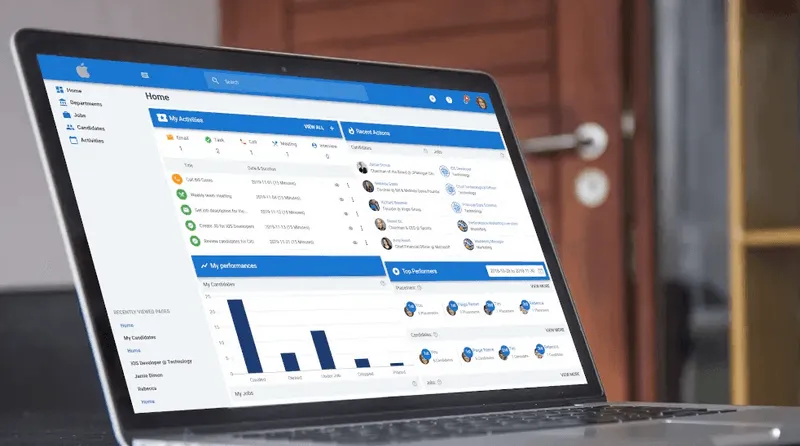
Manatal’s candidate sourcing feature addresses this operational gap. From a single job created in the platform, recruiters can distribute postings to Indeed (Free or Sponsored), LinkedIn, Google for Jobs, and thousands of additional channels in one action. All applications are captured in a unified pipeline, reducing manual handling, supporting GDPR/CCPA requirements, and allowing recruiters to evaluate candidates from different sources side by side.
{{cta}}
How to Decide Between Free vs. Sponsored Posts
Indeed allows free job postings, but visibility typically declines after the first one to two days as newer listings enter search results.
The Decision Framework:
Sponsored listings remain more visible in search results and are generally more effective when time-to-hire or applicant volume is a priority. Outcomes vary significantly by role, location, and competition level, so testing budget levels is often necessary.[3]
Job Description Checklist for Higher Visibility
Many recruiters struggle not with posting a job on Indeed, but with what to write once they get there. A structured approach, like the one outlined in how to write a job description, helps align clarity, compliance, and candidate expectations before publishing.
Use this checklist before publishing to ensure your job description is clear, searchable, and optimized for applicant quality.
- Standardized job title: Matches common industry terminology (no internal or creative labels).
- Clear salary range: Includes minimum and maximum pay where possible to improve click-through rates.
- Concise role summary (2–3 sentences): Explains what the role does, who it’s for, and why it matters.
- Key responsibilities in bullet form: Focused on outcomes and day-to-day work, not generic role descriptions.
- Required vs. preferred qualifications clearly separated: Prevents discouraging qualified candidates while setting realistic expectations.
- Role-specific keywords: Skills, tools, or certifications candidates actively search for (used naturally, not repeated).
- Work arrangement and location clarity: On-site, hybrid, or remote clearly specified using Indeed’s structured fields.
- Screening questions aligned to non-negotiables: Filters out unqualified applicants before they enter your inbox.
- Mobile-friendly formatting: Short paragraphs, bullet points, and no large text blocks.
If your description meets all the above criteria, you are far more likely to attract relevant applicants.
Best Practices for Optimizing Your Indeed Post
To ensure your investment pays off, keep these optimization tactics in mind:
1. Mobile Responsiveness is King
According to Indeed, 78% of job applications on the platform are submitted via mobile devices.[4] If your application process requires uploading a custom cover letter or filling out 20 text fields, you will lose high-quality candidates who are browsing on their lunch break. Keep the barrier to entry low.
2. Natural Language Keywords
Think like a job seeker. If you are hiring a "Customer Success Manager," ensure related terms like "Account Management," "Client Support," and "SaaS" appear in the text. This helps Indeed's algorithm understand exactly what the job entails.
3. Earn the "Responsive Employer" Badge
Indeed highlights employers who respond to candidates quickly. This badge is a trust signal to talent that their application won't fall into a black hole. Try to disposition (accept/reject) applications within 48 hours to earn this visibility boost.
Conclusion
Posting a job on Indeed effectively is about controlling the inputs that determine visibility, relevance, and workload. Structured titles, salary transparency, screening questions, and application flow decisions all directly affect results. When these inputs are intentionally managed and supported by centralized job distribution and applicant tracking, Indeed becomes a scalable sourcing channel rather than a source of noise.
Frequently Asked Questions
Q: Does it cost money to post a job on Indeed?
A: Posting a job on Indeed can either be free or involve a cost, depending on the services chosen. You can use a basic free option or opt for sponsored job postings to increase visibility and reach targeted candidates. Sponsored listings cost varies based on location, industry, and competition, and employers can set a budget to manage spending. Utilizing Indeed's full features typically requires some investment.
Q: How do I edit a job after I have posted it on Indeed?
A: To edit a job posting on Indeed, log into your account and access the employer dashboard. Find the "Jobs" section, select the job you want to edit, and click the "Edit" button. Make your changes, save them, and remember that significant modifications might need re-evaluation by Indeed.
Q: Can I post a job on Indeed without the company name visible?
A: Employers can post jobs on Indeed without revealing their company name by choosing a confidential listing. This approach helps protect competitive information and manage sensitive situations, though it might make applicants wary, affecting application quality and quantity. Providing a detailed job description is essential to attract suitable candidates.
Q: What is the difference between Indeed Apply and applying on a company career page?
A: Indeed Apply and applying on a company career page are two methods for submitting job applications. Indeed Apply is fast and convenient, allowing candidates to apply quickly using their Indeed resume. In contrast, applying on a company site often requires a more detailed process, offering insights into company culture and allowing applicants to tailor their applications, though it can be more time-consuming. Each method has its own advantages; efficiency with Indeed Apply and personalization with direct applications on company sites.
Citations
.webp)







.webp)

.webp)


.webp)


