





Email consistently ranks among the most effective digital channels for customer acquisition, often outperforming social media because it gives companies direct access to an owned audience rather than relying on platform algorithms. Yet most teams still send one-off blasts to cold lists and wonder why nothing converts. For recruitment, email marketing entails the use of targeted, sequenced email campaigns to attract candidates, nurture talent pipelines, and win new client business. While tools like LinkedIn InMail are expensive, having response rates typically ranging from 10-25% [1] and showing signs of decline in recent years. That said, email is the only outreach channel where you own the list and keep the data regardless of platform changes.
Recruitment Email Marketing Goals
Recruitment email marketing covers two distinct commercial goals that require different strategies, different lists, and different content.
The first is talent acquisition. This includes cold outreach to passive candidates, warm nurture sequences for people already in your database, re-engagement campaigns for candidates who went quiet, and drip sequences for talent pools tied to specific roles or skill sets.
The second is business development. This is the use of email to stay visible with hiring managers, win new job orders, and build trust with prospects who are not yet clients. For staffing firms, this is where email marketing creates direct revenue impact.
Most recruitment teams do the first poorly and ignore the second entirely. Both are covered below.
Recruitment Email Marketing Requires the Right Tools
Before getting into strategy, it is worth addressing a practical constraint. Manual email outreach breaks down fast. A recruiter handling 30 active roles cannot realistically track follow-up sequences, maintain clean segments, and prevent duplicate outreach across the team.
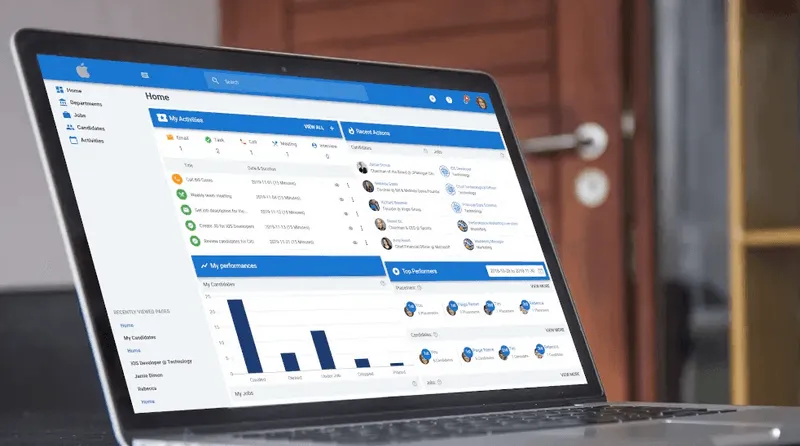
One way recruiters solve this is by using their applicant tracking system to manage candidate outreach directly. Platforms like Manatal include a Mass Emailing feature that allows recruiters to send targeted campaigns to candidates already stored in the ATS. Instead of exporting lists into another marketing platform, recruiters can filter candidates by job pipeline, tags, or talent pools and launch outreach while keeping every interaction attached to the candidate profile.
This approach keeps sourcing, communication, and candidate management inside the same system, which reduces manual work and prevents duplicate outreach across the team.
General Email Marketing Tools
These platforms handle broadcast campaigns well, but they sit outside your candidate database and ATS. Recruiters often have to export lists, cross-reference spreadsheets, and switch between systems to see which campaigns produce placements.
- Mailchimp
- ActiveCampaign
- GetResponse
These tools work well for newsletter style campaigns but were not designed around candidate records, job pipelines, or recruiter workflows.
Recruitment specific platforms solve this by connecting email activity directly to candidate records and pipeline stages.
Tools for Recruitment Marketing Automation
This is where recruitment marketing automation becomes useful because it ties outreach, segmentation, and candidate engagement directly to your hiring workflow instead of running it in a separate marketing system.
- Beamery
- Gem
- Phenom
These systems integrate candidate relationship management, outreach campaigns, and hiring workflows into a single environment.
- Greenhouse Recruiting
- Lever
These tools allow recruiters to select candidates from talent pools, folders, or job pipelines and launch a campaign in a single workflow while automatically handling consent and subscription status.
Tools for Stage Triggered Candidate Communication
Automated communication tools send emails when candidates move through predefined hiring stages.
Examples of platforms with stage triggered communication include:
- Manatal (Email Automation feature)
- SmartRecruiters
- iCIMS Talent Cloud
These systems automatically send the appropriate message when a candidate moves to stages such as application received, interview scheduled, or offer extended.
Tools for Recruitment Email Campaign Tracking
Tracking tools help recruiters understand which outreach campaigns generate engagement.
Platforms that provide campaign tracking include:
- Manatal
- Gem
- Avature
These systems track delivery status, open rates, and engagement per recipient inside the same platform that stores candidate records, eliminating the need to export campaign data into separate reporting tools.
{{cta}}
Strategy 1: Candidate Sourcing and Nurturing
The core problem with most candidate outreach is database waste. The average recruitment database is full of qualified candidates who have never been contacted more than once.A single email blast to 2,000 people with no follow-up sequence, no segmentation, and no clear value proposition often produces open rates around 15% and very few responses, far below the 25–35% open rates commonly reported in email marketing benchmarks.[2]
The fix is segmentation combined with sequenced messaging.
How to Segment Your Candidate Database
Effective segmentation combines three variables: skill set, location, and last interaction date.
Action Plan:
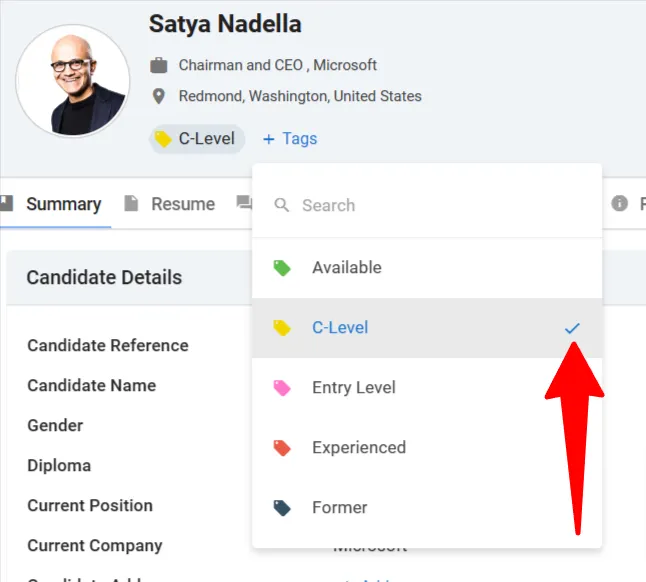
- In Manatal, navigate to your candidate database and use the Filters panel to isolate candidates by skill tag, location, and the date they were last contacted. Save this filter as a named folder, for example, Senior Java Developers, London, Inactive 90 Days.
- For candidates inactive for more than 90 days, apply a tag such as Re-Engagement Queue. This creates a standing list you return to each quarter.
.webp)
3. For new applicants who were strong but not placed, create a folder called Qualified Candidates by role type. Use Manatal's task feature to set a 60-day follow-up reminder for each one.
.webp)
4. Build separate folders for candidates actively looking versus passively open. The messaging and cadence are different for each group.
This means you are not sending one email to 2,000 people. You are sending four targeted emails to 500 people each, with content that is relevant to where they are in the process.
How to Build a Candidate Drip Sequence
A drip campaign is a pre-written series of emails sent at set intervals, triggered by a candidate entering a specific folder or stage. The goal is to maintain contact without manual effort, so that when a role opens, the candidate already knows who you are.
A basic three-email sequence for passive candidates usually looks like this:
- Email 1 (Day 1): Company or team context. Introduce yourself and provide brief context about your agency or hiring activity in their field. Avoid pitching a job in the first message. The goal is awareness, not conversion.
- Email 2 (Day 7): Market insight. Share something useful to their career, such as salary benchmarks, hiring trends, or demand for their skill set. There is still no direct ask. The message should feel informative rather than transactional.
- Email 3 (Day 14): Soft role invitation. At this point, it is appropriate to mention a specific opportunity or ask if they would be open to a quick conversation.
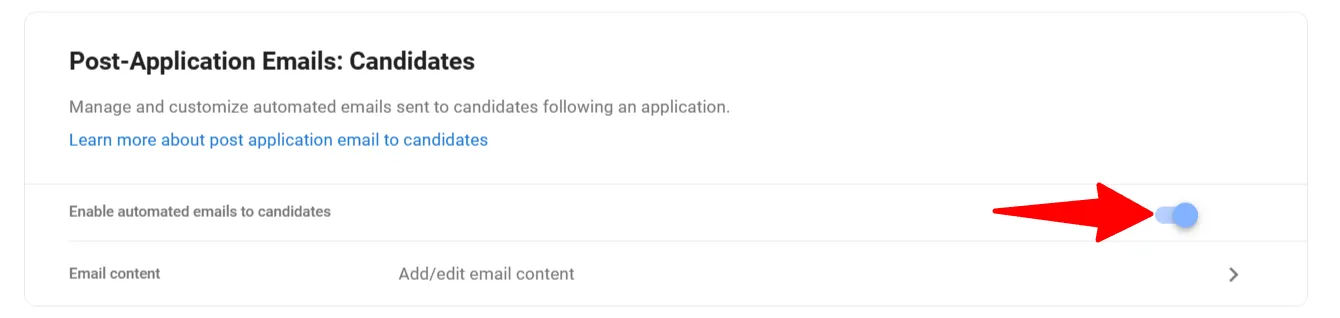
In Manatal, set this sequence up using the drip campaign feature under Email Automation. Set the campaign to stop automatically when the candidate replies. This prevents any contact from receiving follow-up emails after they have already responded, which is a common automation failure that damages relationships.
Candidate Re-engagement Template
For candidates who have been inactive for six months or more, use a direct re-engagement email. Keep it short. Tools like an AI Email Writer can help generate concise, well-structured messages without unnecessary preamble.This email only asks one question and makes no demand. Response rates for re-engagement emails drop sharply when they contain more than two sentences of preamble.
Browse a full collection of candidate engagement messages in these HR email templates.
Strategy 2: Email Marketing for Staffing Firms and Client Acquisition
Most staffing firms rely on cold calls and LinkedIn to win new job orders. Both channels are saturated. Email, used correctly, creates a consistent presence with hiring managers before they have a role to fill. When a need opens up, you are already the person they think of.
The goal of client-facing email marketing is not to sell on the first contact. It is to stay relevant and credible until the timing is right.
How to Build a Targeted Client List
A targeted client list starts with a clear definition of your ideal client profile. Define it by industry, company size, location, and hiring frequency. A tech-focused staffing firm in Southeast Asia should not be emailing every company in the region. They should be emailing Series B and Series C startups with active engineering teams, because those companies have predictable hiring cycles and repeated needs.
Action Plan:
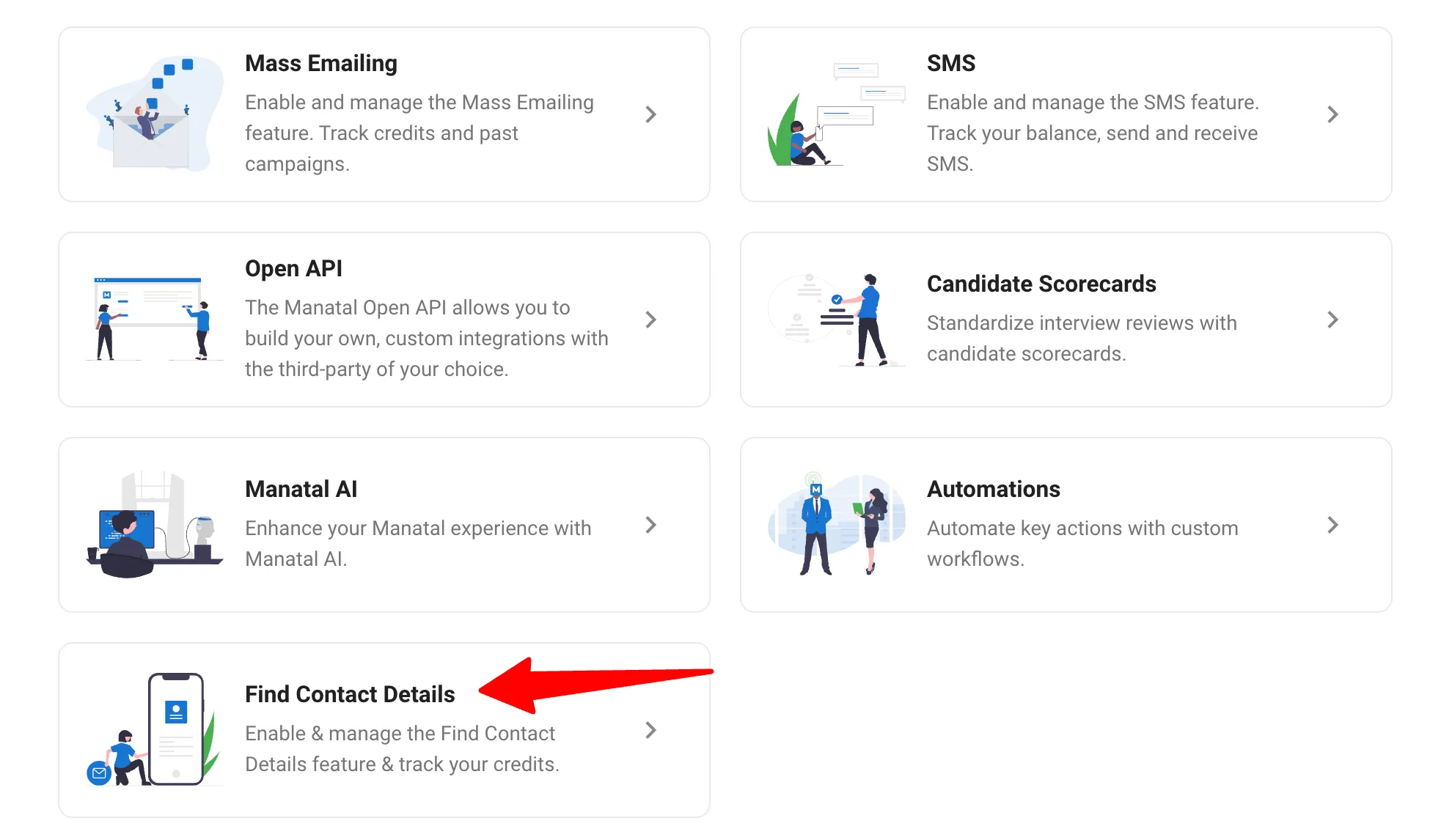
- Use Manatal's Find Contact Details feature combined with its candidate data enrichment functionality to build a database of hiring managers, HR Directors, and Talent Acquisition leads at target companies.
- Segment the list by company size and hiring stage. A 50-person startup has different needs than a 500-person company scaling a new department.
- Validate all email addresses before sending. High bounce rates damage your domain reputation and reduce deliverability for every subsequent campaign. Tools like NeverBounce or ZeroBounce handle bulk validation at low cost.
- Tag each contact in your CRM with the last touchpoint and the outcome. This prevents repetitive or contradictory outreach across your team.
What to Send Clients
The most effective client emails are about the client's problem or the market conditions affecting their hiring decisions. Four content types that work for staffing firm email marketing:
- Anonymized candidate profiles, known in the industry as Most Placeable Candidates. Send a two-paragraph summary of a strong candidate without using their name. Include title, years of experience, key skills, and availability. Subject line example: Java Developer Available Immediately, Open To Relocation.
- Salary and market data. A brief summary of what professionals in a specific role are earning in a specific region. This positions you as a market expert and gives the hiring manager useful data they would otherwise need to research themselves.
- Hiring trend alerts. A short note on what you are seeing in the market. For example, an increase in demand for a specific skill set, or a pattern of candidates leaving a particular sector. Keep it to three sentences.
- Role-specific outreach when you have a strong candidate ready. This is the most direct format and works best when the candidate's profile is clearly matched to the type of roles the client typically hires for.
Client Cold Outreach Email Template
Subject: [Role Type] Available Now, [City Or Sector]
"Hi [First Name], I have a [role title] with [X years] of experience in [specific skill or sector] who is available for [contract or permanent] roles. They are based in [location] and have worked with companies similar to [client company type]. Worth a quick conversation?"
This template works because it leads with the asset, not with a pitch about your agency. The hiring manager's first question is always, who do you have? Answer that question immediately.
Follow-up Sequence for Prospects
Send a follow-up to any prospect who has not responded within five business days. Keep it to one sentence.
"Hi [First Name], circling back on my last note in case it got buried. Happy to share more details on the candidate if useful."
After a second non-response, move the prospect to a lower-frequency nurture sequence. Send them market data or an anonymized MPC once every three to four weeks. Do not push for a call again until you have sent at least two pieces of genuinely useful content.
Ensuring Your Emails Actually Arrive
Three things determine whether your emails reach the inbox: the quality of your list, the authentication records on your sending domain, and how your messages are formatted for the devices people actually use.
Email Decay and List Hygiene
Email decay is the gradual degradation of your list as addresses become invalid. People change jobs, companies fold, and domains expire. Industry estimates suggest that a recruitment database loses roughly 20 to 25% of its valid email addresses every year.[3] Emailing invalid or inactive addresses increases your bounce rate, which signals to email providers that your domain is unreliable. Once your sender reputation drops, even valid contacts stop receiving your emails.
Action Plan:
- Run your full candidate and client list through an email validation tool such as NeverBounce or ZeroBounce before any large campaign send. Remove all hard bounces immediately.
- Set a rule in your recruitment tool to flag candidates or contacts who have not opened any email in the past 12 months. Move them to a re-engagement campaign. If they do not respond to a re-engagement sequence within 30 days, remove them from active campaign lists.
- Never purchase email lists. Purchased lists are full of invalid addresses and spam traps. A single campaign to a purchased list can destroy your domain reputation and affect all future sends.
Authentication: SPF, DKIM, and DMARC
If you are sending recruitment emails from a custom domain without proper authentication, a portion of your emails will never reach the inbox. Mail servers treat unauthenticated domains as suspicious, which leads to filtering or outright blocking.
Three DNS records handle authentication:
- SPF (Sender Policy Framework): Defines which IP addresses are allowed to send email on behalf of your domain.
- DKIM (DomainKeys Identified Mail): Adds a cryptographic signature to each email, confirming the message was not modified in transit.
- DMARC (Domain-based Message Authentication, Reporting, and Conformance): Instructs receiving mail servers what to do when SPF or DKIM checks fail.
These records are configured in your domain’s DNS settings, not inside your email platform. If you use services from Google or Microsoft, both Google Workspace and Microsoft 365 provide setup guides. If your infrastructure is managed by an external IT provider, confirm that all three records are active before launching campaigns.
Subject Lines and Mobile Formatting
According to a study by Genesys, approximately 55-60% of emails are opened on mobile devices.[4] A subject line that is clear on a desktop is often truncated on a phone screen. Keep subject lines under 40 characters. Front-load the most important information.
Bad: New Opportunities Available This Week For Candidates With Experience In Software Development
Good: Java Developer Role, London, Immediate Start
Formatting inside the email matters as well:
- Keep paragraphs to two or three lines
- Use one clear call to action
- Avoid multiple requests in a single message
If you ask a candidate to apply for a role and refer a friend in the same email, most will do neither.
Compliance: GDPR and CAN-SPAM
Every recruitment email must include a clear and functional unsubscribe link. This is mandatory under regulations such as the General Data Protection Regulation and the CAN-SPAM Act.
You also need a lawful basis for contacting each person on your list.
- Candidates: Usually covered by legitimate interest or explicit consent given during application or registration.
- Client contacts: Document how you obtained their information. This may be a form submission, directory listing, or research source.
When someone unsubscribes:
- Remove them from all campaign lists
- Process the request within 10 days (or sooner, as required by specific regulations).
Ignoring unsubscribe requests creates legal exposure and erodes trust with candidates and clients.
Tracking and Optimization
Recruitment email performance comes down to a small set of metrics. Track the numbers that show whether people open, engage, and take action, then improve campaigns through controlled testing.
Key Metrics to Monitor
- Open rate: Shows whether your subject line and targeting are working. Well-segmented recruitment campaigns usually achieve open rates between 25-40%.[5] If open rates fall below 20 percent, the problem is usually the subject line or list quality.
- Reply rate: The most important signal for outbound recruitment email. A reply indicates real interest. Track candidate and client campaigns separately because their benchmarks and behavior differ.
- Click-through rate: Measures engagement with links such as job descriptions, booking pages, or resources. Useful, but less important than replies for direct recruiting outreach.
- Conversion rate: The share of emails that lead to a booked call, completed application, or confirmed job order. This is the metric that connects email activity to placements and revenue.
How to Optimize
- Run A/B tests on subject lines: Send version A to half the segment and version B to the other half. After 48 hours, compare open rates and keep the winning version.
- Test one variable at a time: Change only the subject line, message, or call to action in each test so you know what actually improved performance.
Conclusion
Recruitment email marketing works when it runs on clean data, clear segmentation, and consistent follow-up. Candidate outreach and client development require different messaging but share the same technical foundation. Maintain your database by validating addresses regularly, running re-engagement campaigns for inactive contacts, and removing people who never engage to protect deliverability. Client outreach should lead with useful insight, such as market data or candidate profiles, before asking for a job order. If campaigns are still run manually through general marketing tools, you lose time and visibility. Recruitment platforms that connect email activity directly to your candidate database and CRM remove that overhead and show which campaigns actually produce placements.
Frequently Asked Questions
Q: What is recruitment email marketing?
A: Recruitment email marketing is the use of targeted, sequenced email campaigns to attract candidates, nurture talent pipelines, and win new client business. It applies to both candidate-facing outreach and client-facing business development for staffing firms and recruitment agencies.
Q: How is email marketing for staffing firms different from general email marketing?
A: Staffing firm email marketing operates across two audiences simultaneously: candidates and clients. The content, frequency, and goals are different for each. Client outreach focuses on staying relevant with hiring managers and positioning the firm as a market resource. Candidate outreach focuses on pipeline development and re-engagement.
Q: What is the best way to avoid the spam folder in recruitment email campaigns?
A: Configure SPF, DKIM, and DMARC authentication records on your sending domain. Validate your list before sending to remove invalid addresses. Keep your unsubscribe process functional and honored within 10 business days. Avoid sending campaigns to purchased or unverified lists.
Citations
.webp)






.webp)

.webp)


.webp)


