





Interviewers can form early impressions of candidates very quickly, and research suggests these initial evaluations can influence later interview ratings and outcomes. [1] Structured interviews and standardized scorecards can reduce the influence of subjective judgments by requiring interviewers to assess candidates against predefined, job-related criteria and consistent rating standards. This guide explains what an interview scorecard is, what to include, how to build one, and how to use it consistently across an interview panel.
What Is an Interview Scorecard?
An interview scorecard is a standardized form for grading candidates against predefined, role-specific criteria using a rating scale and evidence notes. Each interviewer scores the same competencies, records what the candidate actually said or did, and submits an overall recommendation.
The terms "interview scorecard," "recruitment scorecard," and "hiring scorecard" all describe the same artifact and are used interchangeably. If you only need the short dictionary definition, see our interview scorecard glossary entry. This article is a full how-to, so we will keep the definition brief and focus on building and running one.
Interview Scorecard vs. Hiring Rubric
People often confuse the rubric with the scorecard, and the distinction matters. The rubric is the standard you set before interviews start: which competencies count, how they are weighted, and what each rating level means. The scorecard is the live artifact each interviewer fills in during and right after the conversation.
You build the rubric once, then every candidate's scorecard draws from it. That is what makes structured interviewing repeatable across a panel; for the broader method, see our guide to structured hiring techniques.
What to Include in an Interview Scorecard
A useful scorecard covers a few distinct components rather than repeating a single idea. Keep each one job-specific so the panel scores what the role needs.
- Role-specific competencies mapped to the job description, not generic "culture fit" labels.
- A calibrated rating scale, such as 1 to 5, with a one-line definition for each level.
- Behaviorally anchored anchors, so a "4" means the same thing to every interviewer.
- An evidence field for the notes or quotes that justify each rating.
- An overall recommendation of advance, hold, or reject, kept separate from the per-criterion scores.
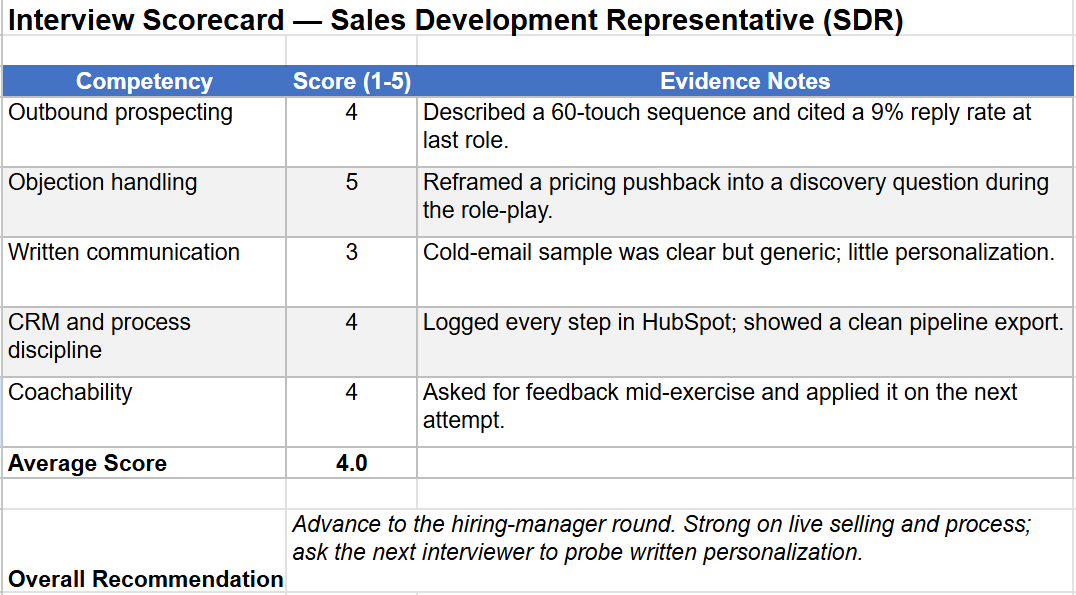
Behaviorally anchored rating scales (BARS) turn a vague number into an observable behavior. On an "objection handling" item, a 1 means they deflect, a 3 gives a standard rebuttal, and a 5 reframes it with a diagnostic question. Anchors like these are why scored interviews produce comparable data, a point we cover in how candidate scoring improves your recruitment process.
Interview Scorecard Example
Most competitor pages stop at the abstract. Here is a complete scorecard for a Sales Development Representative (SDR) candidate on a 1-to-5 rating scale with behavioral anchors.
Structured, scorecard-based evaluations rank among the strongest predictors of job performance. Sackett et al. (2022) reported a predictive validity estimate of approximately 0.42 for structured interviews and 0.19 for unstructured interviews. [2]
How to Build an Interview Scorecard Template
A scorecard should be defined by the role's specific responsibilities rather than by legacy templates. This can be accomplished through five concrete steps.
1. Extract Core Competencies: Pull the must-have competencies directly from the job description and the intake meeting with the hiring manager to define what success looks like in the interview.
2. Weight and Assign Panel Coverage: Weight each competency and split coverage across the interview panel, ensuring each interviewer owns specific criteria they are best equipped to assess.
3. Define Custom Evaluation Criteria & Fields: Establish clear rating scales and behavioral anchors for every competency.
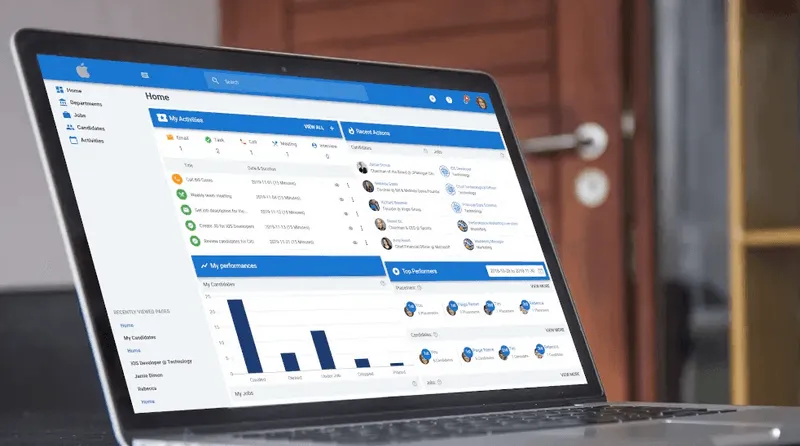
Implementation Tip: When setting up your scorecard in an Applicant Tracking System (ATS) like Manatal, go to Administration > Candidate Scorecards > Forms to set up custom evaluation fields for each criterion.

{{cta}}
4. Incorporate Evidence Prompts & Decision Fields: Add prompts for qualitative evidence from candidates, along with a single recommendation field to advance, hold, or reject candidates.
Implementation Tip: Ensure your system retains an Overall Score field. In platforms like Manatal, this score field is calculated automatically across evaluations to maintain standardized decision-making.
.png)
5. Centralize and Standardize as a Reusable Form: Save the structure as a master template in your recruitment platform or spreadsheet so all interviewers can easily access, submit, or share scorecard requests for future candidate rounds.
How to Use a Scorecard in the Interview Process
A scorecard only helps if the panel runs it the same way every time. Start with a minimal stack, then follow an ordered workflow with human checkpoints.
- Starter stack: a shared spreadsheet template (Google Sheets or Excel) works for teams without an ATS. Teams that want templates, distribution, and one-screen comparison in one place use an ATS with native interview scorecards, such as Manatal.
Run it in this order:
1. Before the interview, finalize the criteria, assign competencies to each interviewer, and distribute the scorecard.
2. During and right after, each interviewer scores their assigned criteria with evidence while the conversation is fresh. No single blended gut score.

3. At debrief, interviewers first submit scores independently, then reconcile discrepancies against the evidence. The decision stays with the hiring team.
4. Record the completed scorecard on the candidate profile for comparison and compliance.
The reconcile-against-evidence step is what protects you when a hire goes wrong. The U.S. Department of Labor estimates that a bad hire costs at least 30% of first-year earnings [3]. U.S. cost-per-hire also averaged about $5,475 for non-executive roles, according to SHRM's 2025 Benchmarking Report. [4] Disciplined scoring is cheap next to that number.
Recruiting Scorecard Templates
Copy both templates into Word, Excel, or your ATS. Customize the competencies for each role before interviews begin.
Template 1: Sales Role Scorecard
Candidate Name: ___________________Role: ___________________Interviewer: ___________________Interview Date: ___________________ Interview Stage: ___________________
Overall Recommendation:
- [ ] Strong Hire
- [ ] Hire
- [ ] Hold (needs more evidence)
- [ ] No Hire
- [ ] Strong No Hire
Interviewer Rationale (2-3 sentences, required):
Template 2: General Role Scorecard (Blank)
Candidate Name: ___________________Role: ___________________Interviewer: ___________________Interview Date: ___________________ Interview Stage: ___________________
Overall Recommendation:
- [ ] Strong Hire
- [ ] Hire
- [ ] Hold (needs more evidence)
- [ ] No Hire
- [ ] Strong No Hire
Interviewer Rationale (2-3 sentences, required):
Scorecards by Role and Interview Stage
No single scorecard format fits every stage. Match the complexity to where you are in the process and keep each stage to its minimum viable criteria.
- High-volume recruiting screens use a lightweight pass-or-fail check on two or three deal-breakers.
- Technical rounds use a skills-and-problem-solving scorecard tied to the actual work.
- Later behavioral rounds use situational criteria that test judgment and collaboration.
- Senior and executive hires use a more comprehensive competency scorecard with more heavily weighted criteria.
Common Hiring Scorecard Mistakes
Even a good scorecard fails when the process around it slips. Watch for these specific patterns.
- Vague or generic criteria that could describe any role.
- Rating scales with no anchors, so a "4" means something different to each interviewer.
- Scoring from memory days later instead of during the interview.
- Letting the most senior voice anchor the debrief before others submit scores.
- Collapsing everything into one blended score instead of scoring each criterion.
Independent scoring before the debrief is also your best guard against interviewer bias, which we cover in how to reduce interviewer bias.
Conclusion
A scorecard turns interviews into comparable, defensible data instead of competing memories. Define the competencies, anchor the ratings, and capture evidence during the conversation. Store every completed interview scorecard in one place, so the whole team compares candidates on the same terms. Build the scorecard. Use it before the first interview. If you want your entire panel to submit their ratings before the debrief call, start a free 14-day Manatal trial.
Frequently Asked Questions
Q: What's the difference between an interview scorecard and a hiring rubric?
A: The rubric is the standard you define before interviews, covering which competencies count, how they are weighted, and what each score means. The scorecard is the completed form that an interviewer fills out for a candidate, with actual scores and supporting evidence. You set the rubric once per role and generate a scorecard for every candidate.
Q: What are the 5 C's of hiring?
A: A commonly used version lists competency, character, communication, culture add, and compensation fit. They work as a starting checklist for your scorecard criteria. Translate each one into observable, role-specific behaviors before scoring, rather than rating broad impressions.
Q: What is the 70/30 rule in hiring?
A: The 70/30 rule is a guideline that the candidate should talk for roughly 70% of an interview and the interviewer for 30%. The point is to gather enough evidence to score fairly. If you talk more than the candidate, you will have little to record on the interview scorecard.
Q: Is an interview scoring sheet the same as a scorecard?
A: In practice, yes. "Scoring sheet" and "scorecard" refer to the same tool: a standardized form for rating candidates against set criteria, with supporting evidence. The label matters less than whether it has role-specific competencies, anchored ratings, and an evidence field. Manatal's customizable interview scorecard templates cover all three.
Citations:
.webp)







.webp)

.webp)


.webp)


