





Staffing agencies that rely on disconnected tools lose an average of 4-5 hours per recruiter per week to candidate sourcing and an additional 3-4 hours to screening and administrative tasks due to administrative overhead, according to 2026 staffing industry analyses. Across a five-person desk, that is roughly 35-45 hours (equivalent to more than four full working days) lost every week to tool-switching rather than billing. [1] This guide covers the purpose-built staffing agency software that addresses that problem, how to evaluate it, and which specialized add-ons are worth stacking on top.
What Staffing Agency Software Actually Is
Most people confuse ATS software with staffing agency software. They are not the same thing. A standard applicant tracking system is built for in-house HR teams hiring their own employees. Staffing agency software operates as a dual-sided engine. It combines an ATS with a recruitment CRM. This integration is non-negotiable for agencies.
- ATS side: Candidate sourcing, resume parsing, interview scheduling, offer management, talent pool database
- CRM side: Client acquisition, job order management, contact tracking, sales pipeline, client reporting

{{cta}}
If your software only does one of those two things, you are running half an agency. You'll win on candidate quality but lose clients to disorganization, or you'll have a pristine CRM and a chaotic candidate process.
All-in-One Staffing Agency Software
1. Manatal (The Recommended Starting Point)

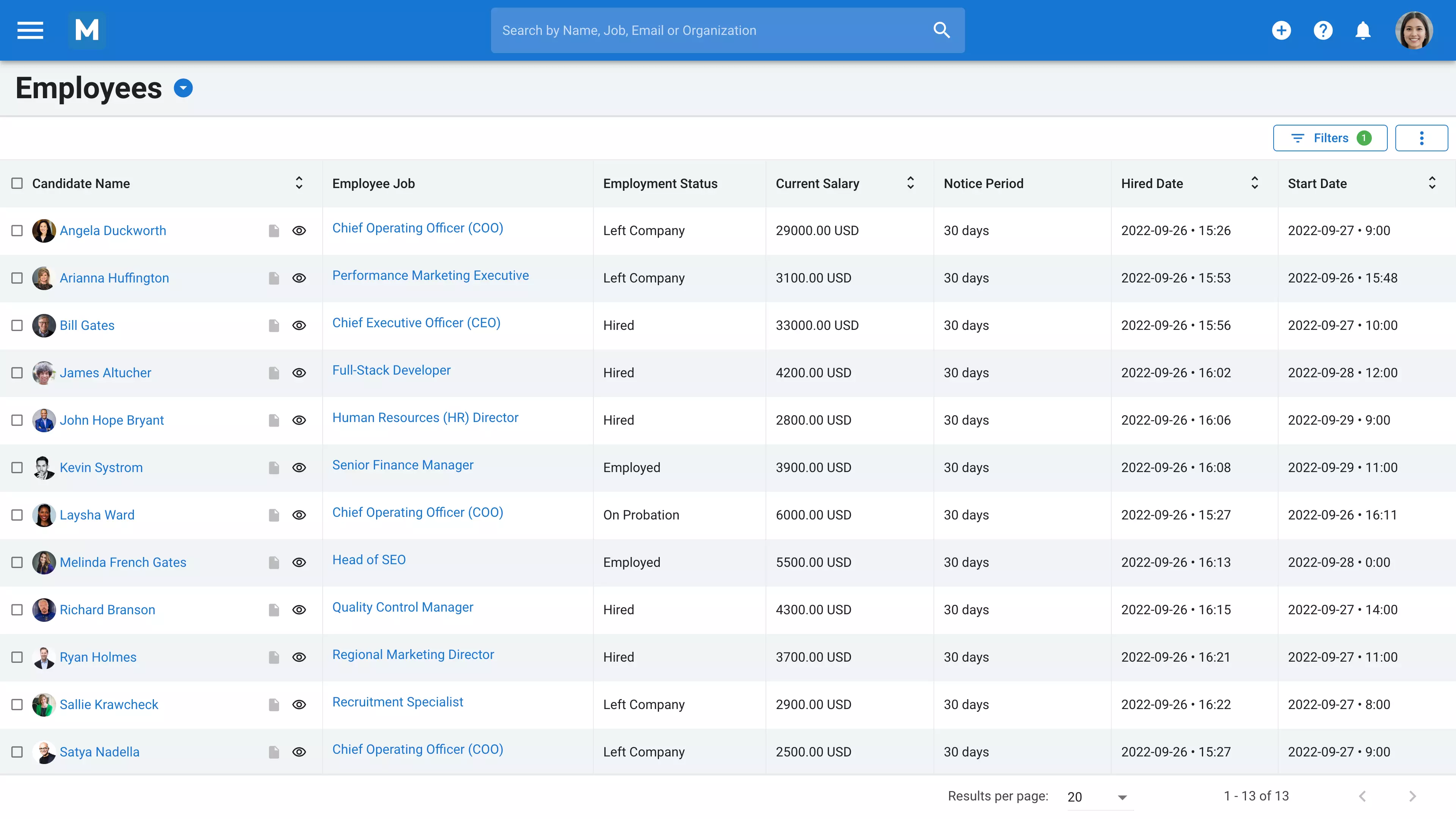
Manatal is a cloud-based applicant tracking system (ATS) tuned with a recruitment CRM (customer relationship management) feature and an AI engine. It is designed for staffing and recruiting agencies of all sizes and industries. This recruitment software can help you source, screen, and hire the best candidates faster and easier. It also helps you track your sales pipeline and generate comprehensive reports and analytics within a few clicks.
Why it matters to agencies: You source a candidate for a finance role. Manatal's AI scans their LinkedIn or other social media profiles, enriches their records with skills data, and scores them against the job. Simultaneously, your recruiter can view which client accounts have open finance mandates in the same dashboard. No tab-switching. No copy-pasting. The candidate and client pipelines run in parallel.
The AI recommendations engine significantly reduces the time to shortlist. Recruiters using it report spending less time manually reviewing resumes and more time on calls that convert. That matters when you are billing on placement speed.
Pricing details: Manatal offers a 14-day free trial. If you’re inclined to try it out for longer after the free trial ends, there are pricing options for businesses of all sizes:
- Professional plan: $15/user/month.
- Enterprise plan: $35/user/month.
- Enterprise Plus plan: $55/use/month.
- Custom plan: Everything in Enterprise Plus, a dedicated account manager, custom features, and custom integrations.
Industry Peer Comparison
Specialized Tools for Staffing Agencies
These are not replacements for your core platform. They are tools that sit on top of it. Use them to close specific gaps in your workflow.
2. HiPeople (Candidate Assessment and Reference Checks)

HiPeople is staffing agency software that is good for reference checks and talent assessments, helping staffing agencies and employers hire better candidates faster. The software offers unlimited reference checks, automated workflows, and integrations with popular ATS and HR software, depending on the pricing plan.
Pros:
- Comprehensive Assessments: HiPeople offers detailed candidate evaluations that provide insights into a wide range of skills and competencies. This depth aids in making informed hiring decisions.
- User-Friendly Interface: The platform is intuitive and easy to navigate, allowing users to efficiently manage candidate profiles and assessments.
- Automation of Reference Checks: HiPeople automates the reference-checking process, reducing manual effort and ensuring consistency in evaluations.
- Integration Capabilities: The platform integrates smoothly with other HR tools, enhancing its utility within existing recruitment workflows.
Cons:
- Integration Limitations: Some users have reported challenges with integrating HiPeople into certain Applicant Tracking Systems (ATS), occasionally necessitating manual data adjustments.
- Assessment Difficulty: A few users found specific assessment questions, particularly in mathematics, challenging, though they acknowledged the value of testing logical and technical skills.
Pricing
Free Plan: One reference check, three assessments, unlimited candidates, data accessible for seven days.
Paid Plans: Contact HiPeople directly for current pricing.
3. Calendly (Interview Scheduling)

Calendly is a free online appointment-scheduling software designed to help recruiters and HR managers schedule meetings and interviews with candidates and clients with ease. One advantage of Calendly is that you can create your own personalized Calendly link and share it with your candidates. The software can be integrated with your calendar, email, and other tools like Zoom, Slack, and Salesforce.
Pros
- Intuitive interface for both users and invitees, making it easy to set up meetings without technical expertise.
- Automatically syncs with calendars such as Google Calendar, Outlook, and iCloud to prevent double bookings.
- Allows users to set buffer times, the maximum number of meetings per day, and available hours.
- Enhances workflows with automation platforms such as Zapier.
- Automatically adjusts for different time zones, reducing scheduling errors for international clients.
Cons
- Group scheduling, team features, and robust analytics require paid plans.
- Offline scheduling or manual overrides aren’t as user-friendly.
- While it allows some branding, deeper customizations for unique workflows or specialized use cases are restricted.
- Sharing scheduling links can sometimes feel impersonal or invasive, especially in certain cultures or professional settings.
- Features like calendar invites and reminders are already integrated into some platforms.
For staffing agency recruiters, Calendly offers a standout feature that streamlines scheduling: the team scheduling function. This allows you to do more than just set up one-on-one interviews. You can easily arrange group interviews, collaborate with other team members by co-hosting meetings, or even share hosting duties. This flexibility ensures smooth coordination between recruiters, candidates, and clients, making it a valuable tool for managing multiple stakeholders in the hiring process.
Pricing
- Free: This plan is for recruiters who want to try out the basic features of Calendly. It allows you to connect one calendar, create one event type, and integrate with video conferencing tools.
- Standard: $10 per user/month or $12 per user per month.
- Teams: $16 per user per month if billed annually, or $20 per user per month.
- Enterprise: This plan is for teams of 30 or more who need enhanced security, control, and support.
4. CallMantra (Recruiting Phone System)

CallMantra is a cloud-based calling and texting software for recruiting teams. It helps you connect with more candidates and make more placements with the phone system built for recruiters and recruiting managers. You can integrate CallMantra with your ATS, including Manatal, send personalized text messages and voicemails; use a power dialer and verified calling; and monitor your team’s performance and analytics.
Pros:
- Seamless Integration with Applicant Tracking Systems (ATS): CallMantra integrates with over 30 ATS platforms, enabling recruiters to automatically log calls and texts and enhancing workflow efficiency.
- Verified Calling Feature: This feature increases the likelihood of candidates answering calls, leading to more successful connections.
- Call Transcription: The software transcribes calls, making it easier to write candidate summaries and share important conversations with team members.
Cons:
- Lack of Video Calling Feature: As of now, CallMantra does not offer video calling, which may be a limitation for recruiters who prefer face-to-face interactions with candidates.
Pricing:
- Free plan: Full features for 14 days
- Standard: $20.95–$25.95/user/month (annual/monthly)
- Pro: $39.95–$49.95 (1,000 minutes, power dialer, call recording, verified calling)
- Premier: $79.95–$99.95 (unlimited calling and texting, SSO, custom telephony)
5. SuiteCRM (Open-Source Option for Technical Teams)

SuiteCRM is a versatile open-source customer relationship management (CRM) software designed to cater to a wide range of industries. It provides tools for managing sales, marketing, customer service, and support, enabling businesses to streamline their interactions and build stronger relationships with clients. Unlike specialized recruitment software, SuiteCRM is not tailored specifically for hiring or candidate management. While it can be customized for recruitment tasks, its core features are geared toward general business processes, making it a flexible but less targeted choice for organizations focused solely on talent acquisition.
Unique Feature:
- Customizable Modules: Users can tailor SuiteCRM to their needs by creating custom modules, fields, and workflows to align with specific business processes.
- Advanced Reporting: Robust reporting tools allow businesses to generate detailed insights and analytics, helping to track performance and make informed decisions.
- Sales Pipeline Management: SuiteCRM provides a comprehensive view of the sales pipeline, enabling businesses to track opportunities from lead to closure.
- Security Features: Granular role-based access control ensures data security by limiting access to sensitive information based on user roles.
Pricing
SuiteCRM does not provide pricing information but allows agencies to access their public demos and get a 30-day free trial.
The "Free Software" Problem
Searching for "staffing agency software free" is a trap. "Forever Free" software is a liability. These platforms usually lack SOC II security. They limit how many candidates you can upload. They offer zero support when the system crashes.
5 Signs You Have Outgrown Free Software
- Your database has reached its limit, and you cannot add new candidates.
- You are manually moving data between three different apps.
- You have no reporting to show clients your fill rate.
- Your team is having a disagreement about who owns a candidate because the system doesn't provide audit trails.
The right approach is not "find free software." It is "find premium software with a real free trial." That distinction matters. A 14-day free trial on enterprise-grade software gives you the full product with no limits. You test the actual tool your team will use long-term. A freemium plan gives you a stripped-down version designed to frustrate you into upgrading.
Conclusion
The agencies that treat software as an overhead cost will continue to compete on relationships and reputation. Those that treat it as infrastructure will outpace them in placement speed and client retention. Free staffing agency software trials can help businesses find efficient, streamlined staffing solutions. These trials allow you to assess the user interface, features, and overall functionality of the software, enabling you to make an informed decision and potentially save money in the long run.
Start with Manatal's 14-day free trial. No credit card required.
Frequently Asked Questions
Q: What goes into a candidate sourcing strategy when using staffing agency software?
A: A strong candidate sourcing strategy within staffing software typically layers three channels: job board integrations (Indeed, LinkedIn, and ZipRecruiter) that push applicants directly into the ATS; a searchable internal talent pool built from previous placements; and sourcing candidates through social media enrichment tools that build profiles beyond what a resume contains.
Q: How does staffing agency software support candidate sourcing strategies across multiple clients simultaneously?
A: The CRM layer handles this. When a recruiter is working five active job orders for three different clients, the software maps candidates to open requisitions across all of them at once. AI recommendation engines rank candidates against each job's requirements, so a recruiter sourcing candidates for one role will surface matches for others in the same search, reducing duplicated effort and shortening the time between first contact and submittal.
Q: Can staffing agency software replace a dedicated sourcing tool like LinkedIn Recruiter?
A: Not entirely, but it reduces dependence on it. Most enterprise staffing platforms integrate with LinkedIn to pull candidate profiles into the ATS with one click. What they do not replicate is LinkedIn Recruiter's InMail volume and its search depth within LinkedIn's private network. The practical approach for most agencies is to use LinkedIn as a sourcing origination point and let the ATS handle everything downstream from first contact through placement.
Q: How do candidate sourcing strategies differ between high-volume and executive search agencies using the same software?
A: High-volume agencies prioritize sourcing speed: bulk resume parsing, automated screening questionnaires, and power dialers to contact hundreds of candidates per week. Executive search firms prioritize sourcing depth: detailed relationship history, private notes on passive candidates, and CRM features to track multi-year client relationships alongside candidate ones. Most enterprise staffing platforms support both modes, but the configuration matters.
Citation:
.webp)







.webp)

.webp)


.webp)


