





LinkedIn automation software elevates outreach from a series of tedious, repetitive tasks into a sophisticated, structured workflow. Relying on manual processes often leaves professionals bogged down by sending copy-paste InMail messages, managing cumbersome spreadsheets, and inevitably letting vital follow-ups slip through the cracks as connection volume scales. For agency teams building client pipelines, these manual bottlenecks severely throttle both efficiency and growth.
- Passive candidate sourcing: It starts with defining Boolean search criteria to target the right profiles. The tool extracts profile URLs and runs a sequence: profile view on day one, connection request with a variable message on day two, and a follow-up on day four if accepted without reply. Manual execution caps output at about 50 quality touches per day. Automation scales this to hundreds of timed interactions.
- Agency business development: Target founders and talent acquisition leaders at mid-market software companies. The system pulls profiles from Sales Navigator saved lists. It then triggers outreach campaigns offering matched candidates from your database. The software handles initial contact volume while you focus on converting conversations into signed retainers.
Best LinkedIn Automation Tools for Recruiters
With this context established, the following are the best LinkedIn automation software options recruiters use to scale sourcing and outreach.
Pro tip: People-Match AI Chrome Extension connects LinkedIn sourcing directly to the platform. When a profile is imported, Manatal's candidate enrichment feature uses AI to automatically fill in additional details such as skills, experience, and contact information. With both of these tools, you can reduce manual data entry and keep candidate profiles more complete as they enter the pipeline.
{{cta}}
How to Use These Tools for Data-Driven Hiring
After selecting the appropriate tools, the next step is to connect outreach, data capture, scoring, and follow-up within a unified workflow.
Set up the sourcing sequence
Start in Expandi by opening the Campaigns tab and selecting a Connector Campaign. Paste the Sales Navigator search URL for your target candidates, then write a short connection message under 300 characters. Add a first name variable for basic personalization, set a daily limit of around 40 requests, and launch the campaign. This starts a steady flow of outreach.
Capture and organize candidate data

As prospects begin to accept or reply, open People-Match AI Chrome Extension directly on their LinkedIn profiles, click the extension icon, and select “Create Candidate”. This automatically pulls in work history, education, skills, and available contact details, which can then be used to trigger follow-up actions through Zapier's trigger and actions. Assign each candidate to the appropriate job pipeline so profiles are structured from the start.
Trigger internal follow-ups
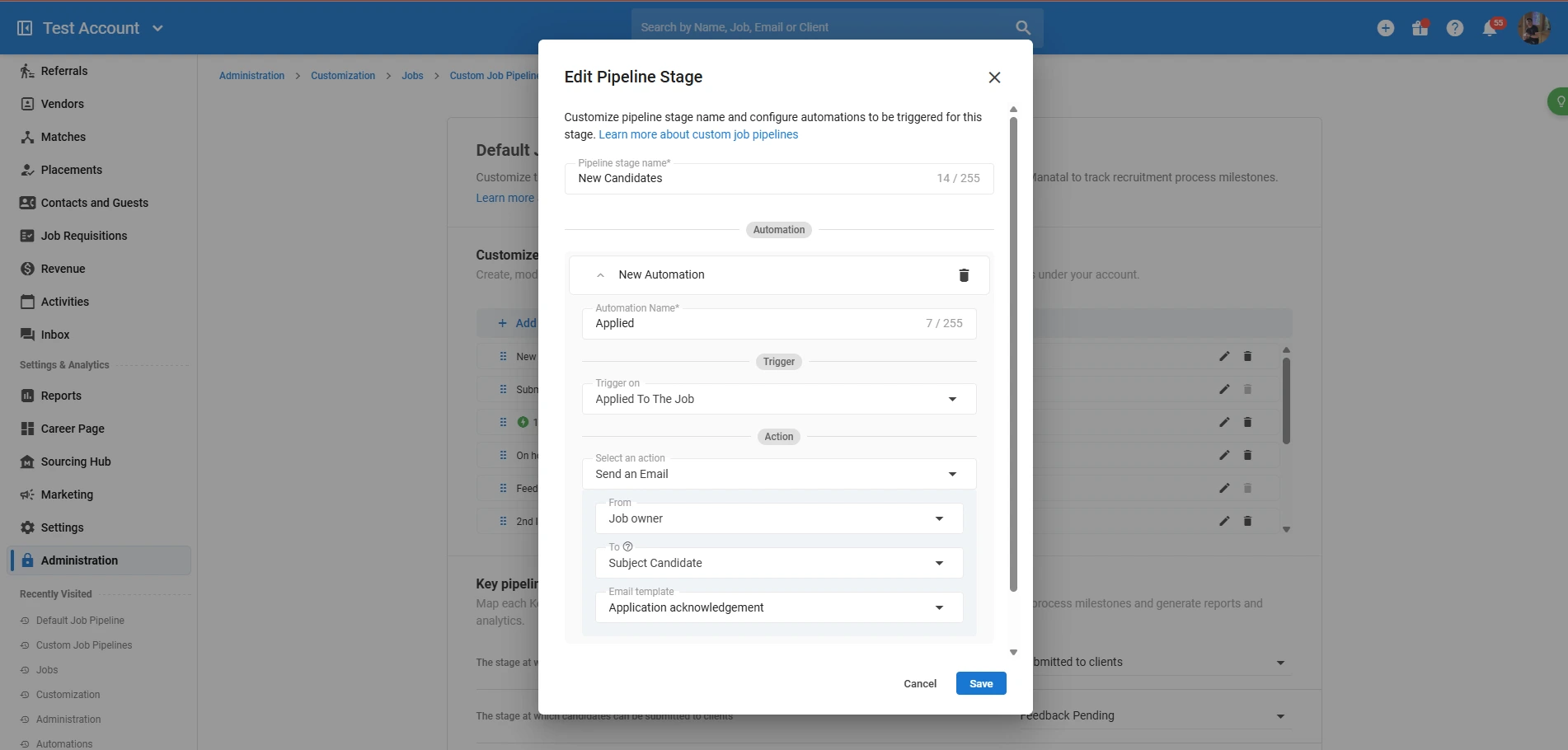
With candidates entering the pipeline, create a rule based on stage movement. Set the trigger to activate when a candidate moves into the Sourced stage, then define an action to send a technical prescreening questionnaire by email. This setup follows Manatal’s automation workflows, allowing you to standardize early-stage screening without handling each step manually.
Prioritize using scoring rules

Next, define scoring criteria in the job’s AI Recommendations settings (or Summary tab). Assign weights to key requirements like React experience or AWS certification, then apply the model across your pipeline. This helps surface the most relevant candidates first as responses come in.
Handle rejections automatically
For candidates who don’t move forward, create a rejection email template and set up an automation trigger for the Rejected stage (or “Drop From” the previous stage). This sends the rejection email template immediately. This keeps communication timely without adding manual workload.
Extend the same workflow to business development
In parallel, use PhantomBuster to extract a list of target hiring managers from Sales Navigator. Import that list into Expandi and run a separate outreach campaign with a candidate-led message. Set a follow-up delay of a few days to maintain consistency.
Convert responses into active opportunities
When a hiring manager replies, log the conversation in the Manatal recruitment CRM. Create the company profile, attach the interaction, and open a Job Order linked to that account. From there, move relevant candidates into the interview stage and continue the process within a structured pipeline.
Conclusion
LinkedIn automation software primarily operates at the top of the funnel. It supports initial outreach but does not handle resume parsing, interview scheduling, or compliance tracking across the recruitment pipeline. Running outreach without a centralized applicant tracking system leads to data fragmentation and candidate loss in unmanaged inboxes. Set up Manatal as your core database before launching any sequence. Connect your email and calendar, then use the best software for LinkedIn lead automation to capture candidates and push them into structured pipelines. Install the browser extension to capture incoming profiles efficiently and reduce manual data entry.
Frequently Asked Questions
Q: What are the best tools for LinkedIn automation?
A: Expandi, Dux-Soup, PhantomBuster, LinkedHelper, and Meet Alfred are common LinkedIn automation tools for recruiters. They help automate connection requests, messaging, profile views, and multi-step outreach, while the People-Match AI Chrome Extension helps move candidate data into Manatal for structured recruitment workflows. Used together, these tools reduce manual outreach work and keep candidate data organized.
Q: How does LinkedIn automation work?
A: LinkedIn automation uses software to execute preset actions such as viewing profiles, sending connection requests, following up with messages, and running outreach sequences with minimal manual input. Recruiters define the rules once, then the tool handles timing, distribution, and follow-up activity across targeted prospect lists.
Q: Which LinkedIn automation services offer free trials?
A: Tools such as Expandi, Dux-Soup, and Meet Alfred commonly offer trial access, which lets recruiters test sequence building, messaging, and workflow controls before committing. Trial access is useful for comparing how each platform handles outreach volume, personalization, and campaign management
Q: What is the best software for LinkedIn lead automation?
A: The best LinkedIn automation software depends on your workflow. Tools like Expandi and Meet Alfred handle outreach sequences, while platforms like Manatal ensure candidate data is captured and managed inside a structured recruitment pipeline.
.webp)







.webp)

.webp)


.webp)


