





When a staffing agency secures a new enterprise contract, recruiters often discover that every candidate must go through the client's VMS portal. This requirement creates immediate confusion around ATS vs. VMS functions: while both systems handle job postings and candidate profiles, they serve different organizations and operational goals. Understanding the roles of an ATS, a VMS, and a workforce MSP helps staffing agencies and enterprise teams determine which systems they need and how to coordinate their workflows.
What Are ATS and VMS?
An Applicant Tracking System (ATS) helps employers and staffing agencies manage recruitment workflows, including job postings, resume parsing, candidate screening, interview scheduling, and offer management. The available features vary by platform.
Vendor Management System (VMS): A VMS is used primarily by enterprise employers, rather than individual staffing agencies, to manage their external labor suppliers and overall contingent workforce programs. It automates requisition distribution to staffing vendors, enforces bill rate cards, collects candidate submissions, manages worker onboarding, approves timesheets, and tracks vendor performance scorecards.
ATS vs. VMS: Key Differences
While both systems store candidate profiles and manage requisitions, the ATS is candidate-centric, whereas the VMS is supplier-centric and spend-focused.
How MSPs Fit
A workforce managed service provider (MSP) is an external party engaged to run the day-to-day operations of an enterprise’s contingent workforce program. The MSP operates the client’s VMS platform and coordinates between the enterprise and its staffing suppliers.
The relationship between an ATS, a VMS, and an MSP follows a clear operational sequence:
- Enterprise sets parameters: The employer establishes contingent workforce goals, budgets, and compliance rules.
- MSP manages operations: The workforce MSP handles day-to-day operations using the client's VMS.
- Requisitions distribute: The VMS releases open temporary roles to pre-approved staffing suppliers.
- Agencies source in ATS: Staffing agencies receive the order, source talent from their internal ATS, and submit qualified candidates back to the VMS.
According to figures attributed to Staffing Industry Analysts (SIA) research, MSP and VMS programs accounted for 80.5% of US travel nurse staffing revenue and 64.0% of allied health staffing revenue. [1] These figures highlight the importance of understanding how MSPs and VMS platforms operate when aligning an agency's internal systems with client requirements for contingent staffing.
Integrate Your ATS With a Client's VMS
According to Staffing Hub's 2025 State of Staffing Report, only 34.1% of respondents who use a VMS had integrated it with their internal systems, such as an ATS or back-office software. [2] This highlights an opportunity for staffing agencies to review how their ATS and client VMS exchange candidate and requisition data. The following steps outline how to plan and manage this process.
Step 1: Confirm the Client's VMS Integration Requirements
Before connecting systems, confirm how the client's VMS accepts candidate submissions. Identify the available integration methods, required candidate fields, submission deadlines, and status updates to determine what your workflow must support.
Step 2: Map Required Data Fields
Align the client's VMS fields with the information stored in your ATS. Common requirements include VMS requisition IDs, candidate details, worker categories, bill rates, and submission statuses.
How to do it with Manatal: Create custom fields to record client-specific information, such as requisition IDs and worker categories. Check that the required field types are supported and establish consistent naming conventions before processing submissions.
.png)
{{cta}}
Step 3: Connect Requisitions to Your ATS Workflow
Ensure every candidate is linked to the correct client requisition. A consistent process for creating and tracking requisitions reduces manual errors and makes it easier to manage multiple VMS accounts.
How to do it with Manatal: Create job records in Manatal and use custom fields to store the corresponding VMS requisition IDs. If the client's system supports a compatible integration, evaluate whether the Manatal Open API or Zapier can transfer the required data.
.png)
Step 4: Source and Screen Candidates
Identify candidates whose skills and experience match the client's requirements before submitting their profiles. Check existing records to reduce duplicate submissions and review any client-specific eligibility criteria.
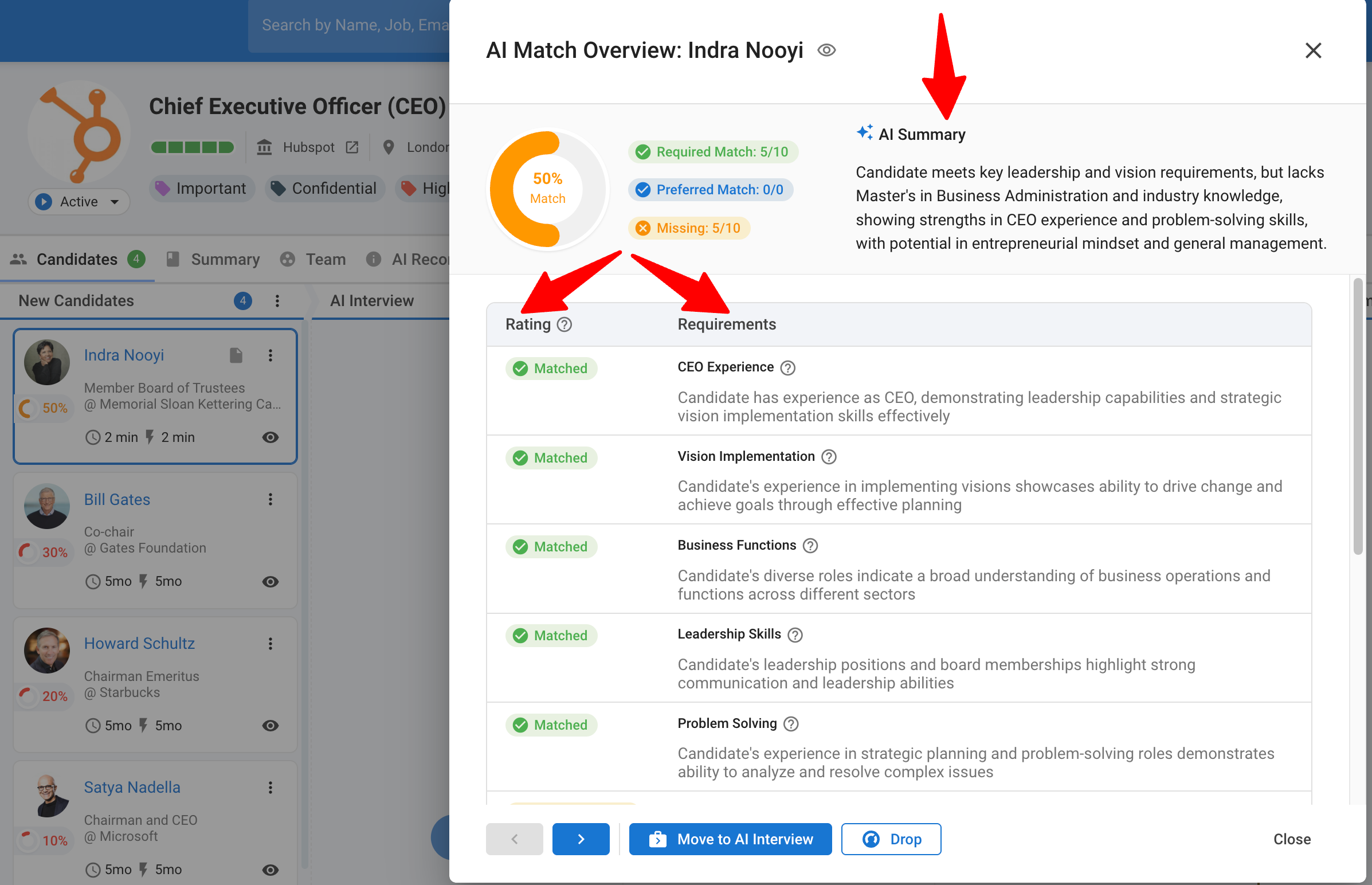
How to do it with Manatal: Use AI Candidate Recommendations to identify and rank potential matches in your candidate database. Review existing candidate records and the client's submission history before sending profiles to the VMS.
Step 5: Prepare Client-Ready Candidate Profiles
Format candidate profiles according to the client's submission standards. Some clients require branded resumes, while others request anonymized profiles or specific document formats.
How to do it with Manatal: Use the Custom Resume Builder to generate resumes using parsed candidate information and configured templates. Prepare a suitable template for each client's requirements, and verify that any required redaction is completed before submission.


Step 7: Submit Candidates and Record Confirmation IDs
Submit approved candidate profiles through the client's designated VMS portal or supported integration. Record the submission date, requisition ID, and confirmation reference so your team can trace each submission and follow up when needed.
How to do it with Manatal: Use Manatal's custom fields and notes to document client-specific submission details in candidate records. If your workflow requires VMS confirmation IDs or submission timestamps, configure suitable fields where supported and verify that your team can record and retrieve this information consistently.
Step 8: Track Candidate Progress and Supplier Performance
Keep candidate statuses aligned between your ATS and the client's VMS to prevent missed interviews, delayed follow-ups, and outdated records. Review submission-to-interview ratios, fill rates, and placement outcomes to identify workflow issues.
How to do it with Manatal: Update candidate stages and maintain notes on VMS status changes. Use Manatal's Reports and Analytics to review available recruitment metrics and compare them with client VMS reports during monthly supplier performance reviews.
Common ATS and VMS Integration Mistakes
- Treating a VMS as a primary candidate pool: Relying on client VMS portals as a talent repository causes agencies to lose candidate relationships when requisitions close.
- Manual double data entry: Re-keying candidate profiles into individual client portals increases administrative overhead and introduces errors.
- Ignoring submission response SLAs: Delayed submissions lower supplier scorecard ratings within the VMS, reducing future requisition allocations.
- Failing to track Right-to-Represent (RTR) agreements: Missing RTR documentation leads to candidate ownership disputes with competing agencies inside the VMS portal.
A VMS determines how job orders reach a staffing vendor, but the vendor's ATS determines whether they fill those orders. VMS scorecards reward fast submission times and high match accuracy, both of which depend on a clean, searchable candidate database. Agencies that source instantly from an established talent pool respond faster than competitors who start every search from scratch.
Conclusion
The difference between an ATS vs. VMS comes down to their primary roles in recruitment and contingent workforce management. An ATS handles candidate records and recruitment workflows for direct hires, whereas a VMS coordinates contingent workforce suppliers, requisitions, and program administration, often under the oversight of a workforce MSP. To streamline operations when working with VMS-mandated clients, staffing agencies should document submission requirements, map required data fields, and confirm supported integration methods. This workflow review reduces duplicate data entry, improves record accuracy, and keeps candidate submissions fully aligned with client requirements.
Frequently Asked Questions
Q: What does VMS mean in recruiting?
A: VMS stands for Vendor Management System. In the ATS vs. VMS landscape, a VMS is software used by enterprises and managed service providers to distribute contingent requisitions, track vendor submissions, enforce bill rates, and manage contractor timesheets and billing.
Q: Can a staffing agency use a VMS instead of an ATS?
A: No. In any ATS vs. VMS evaluation, the core purposes differ: a VMS is built for enterprise procurement and supplier oversight, not for candidate relationship management. It lacks candidate sourcing, resume parsing, engagement tools, and pipeline workflows essential for staffing agency operations.
Q: What are examples of VMS platforms?
A: Common enterprise VMS platforms include SAP Fieldglass and Beeline. These platforms are selected and maintained by enterprise buyers or their MSPs, whereas staffing agencies use an ATS to manage their internal candidate pool.
Q: Is VMS software still used today?
A: Yes, VMS adoption remains widespread across enterprise contingent labor programs. In specialized sectors like healthcare, SIA reports that over 80% of US travel nurse staffing revenue flows through MSP and VMS structures.
Q: Do recruiters really use an ATS?
A: Yes. Recruiters use an ATS such as Manatal daily as their central system of record to manage candidate pipelines, track interactions, automate workflows, and format resumes before submitting candidates into client VMS portals.
Citations:
.webp)







.webp)

.webp)


.webp)


